Recreatex 8.6.2
New versions and remarks
The Recreatex 8.6.2.0 release contains the development and internal optimisation tickets for the following applications:
|
|
Important
As of version 8.5.0.0, all Web applications follow the versioning of Recreatex backoffice, transitioning directly from the previous version 6.4.2.0 to 8.5.0.0.
As of version 8.5.3.0, the Vintia Order Kiosk and Vintia Order App use their own versioning scheme.
Recreatex version support
Supported versions: Recreatex 8.5.0.X and higher
Detailed version support information is available at Recreatex version support.
Important reminders
Microsoft has stopped supporting Office 2003 and Office 2007. We recommend that you update to Office 2016, which Microsoft will support until 14th October 2025.
From version 7.1.0 onwards, Recreatex requires .NET 4.7.2. We recommend that you update your systems accordingly.
The minimum required SQL Server version is now Microsoft SQL Server 2019 Standard. We recommend using Microsoft SQL Server 2022 Standard edition for optimal performance, stability, and compatibility with recent Recreatex versions.
Release highlights
General
Manage article price indexing within Recreatex
The new Article price indexing processing tool in Recreatex allows users to adjust article prices in bulk directly within the application. It replaces the previous workflow that required access to the external SyDelCo application and manual Excel-based processing. Price indexing can now be completed entirely within Recreatex through a guided, form-based workflow.
The new tool is located under General > Basic data > Articles > Processing > Article price indexing
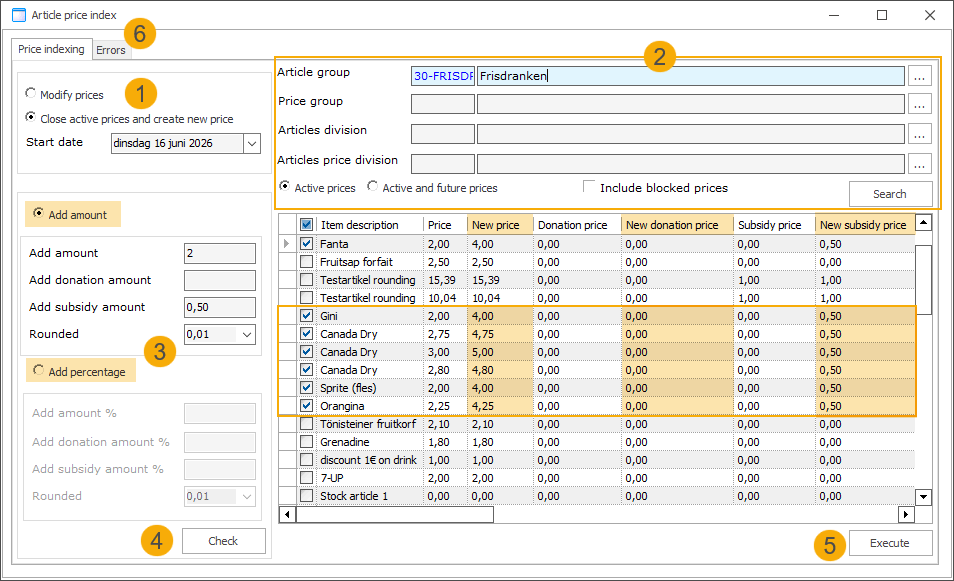
Choose how the prices should be updated:
Modify prices: Adjusts the existing price records.
Close active prices and create new price: Closes the current active prices by setting an end date and creates a new price record.
Start date: Set the date on which the new price should become active.
Use the criteria below to narrow down the selection of article prices you want to adjust. Then click Search to display the results in the overview section.
Select one or more of the following:
Article group
Price group
Article division
Article price division
Choose which prices to include based on their status:
Active prices: Only the currently active prices based on today's date or the specified start date.
Active and future prices: Includes active prices and prices with a future start date.
How active prices are determined
For Modify prices, active prices are determined based on today's date.
For Close active prices and create new price, active prices are determined based on the specified start date.
Blocked (checkbox): Select this option if blocked articles should be included in the selection.
Specify how you want to adjust the price.
Add amount: Enter a fixed amount to add to the article's sales price, donation price, and/or subsidy price.
Add percentage: Enter a percentage to add to the article's sales price, donation price, and/or subsidy price.
Rounding options: 0.01 (default), 0.05, 0.10, 0.50
Note
Negative values are supported for price decreases.
Select the price lines you want to modify and click Check. The updated prices are displayed in the overview, allowing you to review the changes before applying them permanently.
Click Execute to process the price modifications.
Any errors that occur during processing are displayed in the separate Errors tab. Review these records and process them manually.
Improvements
General
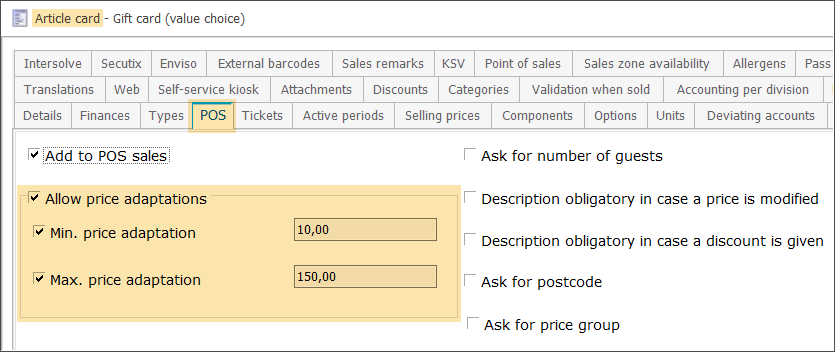
The existing Allow price adaptations feature has been extended with optional minimum and maximum limits, allowing more controlled price adjustments at the POS and helping enforce business rules (e.g., regulatory limits on gift cards) when required.
Selling prices are now managed using the Blocked functionality, in line with the Recreatex framework, ensuring data consistency and traceability.
Applies to both article selling prices and deviating prices of article components.
Prices can no longer be deleted.
Use the Blocked checkbox in the selling price configuration (tab General) to hide prices and prevent further use.
Data, history, and logging remain preserved.
Prices can be unblocked if needed.
Event planning
Invoice contact selection on event file and file component level
Users can now specify an invoice contact person directly on the event file and file components (subfiles), selecting from the invoice customer's contacts. This invoice contact is also copied to the sales header when booking files or file components and can be used on invoices, reports, and exports.
New field Invoice contact person has been added to the file and file component forms. (1)
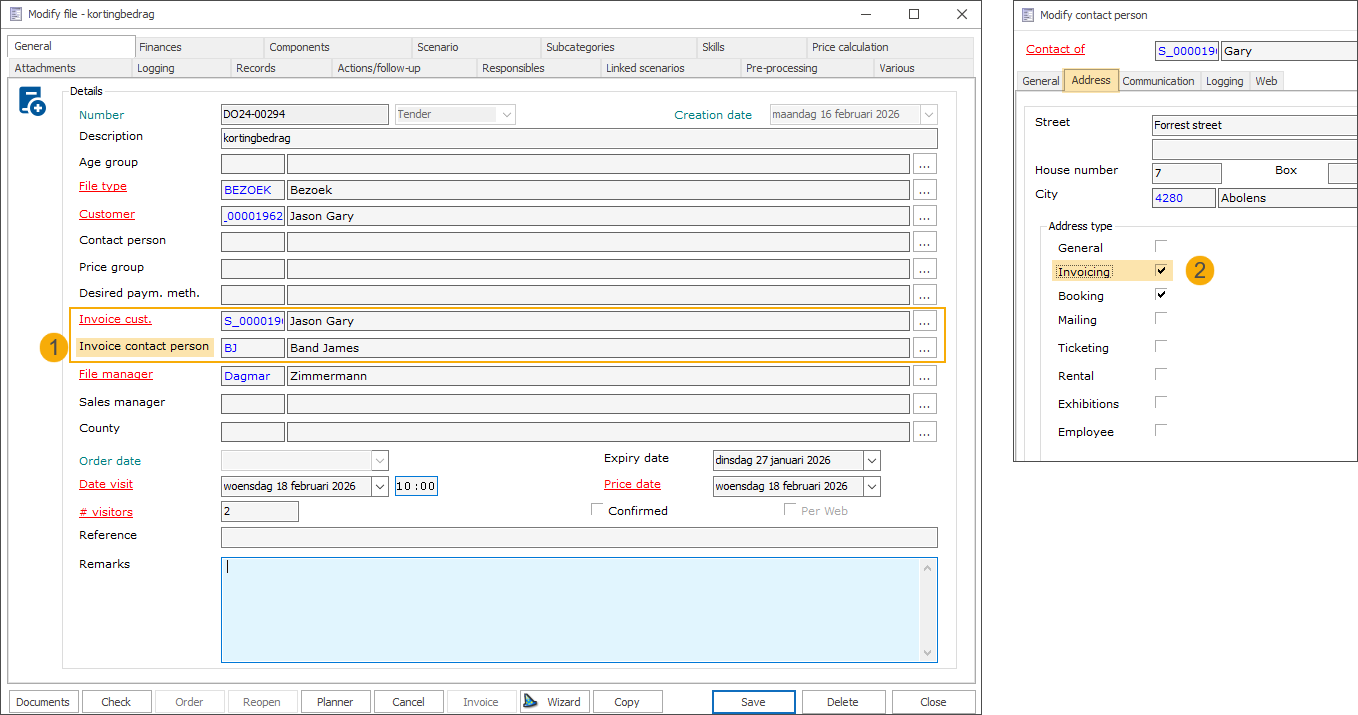
The field is only available when an invoice customer is selected.
Only contacts configured as an Invoicing contact type (2) can be selected, and they must have an external debtor number.
When an invoice contact is selected on a file, it is automatically copied to its file components.
When an event file or file component is booked, the selected invoice contact is copied to the sales header and overrides the default invoice contact logic.
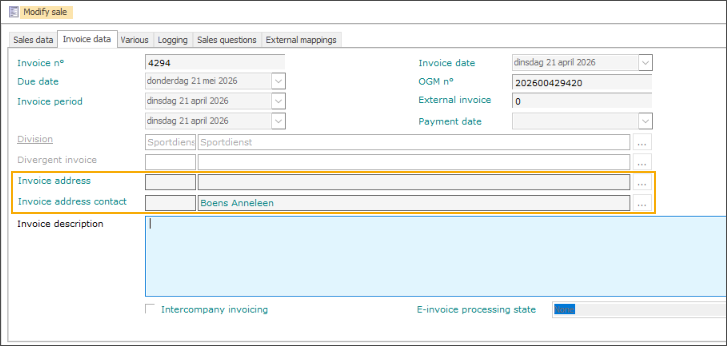
Two new fields, Invoice address & Invoice address contact, are now available on the sales header to store the data.
The selected contact is used on all resulting invoices.
Files and file components with different invoice contacts will always produce separate invoices.
Batch invoicing: Sales headers with different invoice contacts are no longer bundled into a single invoice, ensuring each contact receives their own invoice. Only invoices with the same invoicing customer and contact are bundled.
Invoice exports & reports: All relevant invoice export processes and Crystal Reports templates have been updated to support the new field. The field can now be included in invoice exports and visualised in Crystal Reports.
Activities
Student access with required instructor presence
For activities such as swimming, you can now require the instructor to be present before participants are allowed to enter. This feature can be combined with existing time-based access windows for activities.
The membership created for an activity registration now retains a link back to the source activity, allowing the system to verify instructor presence at access time.
Two new settings have been added to the access group configuration:
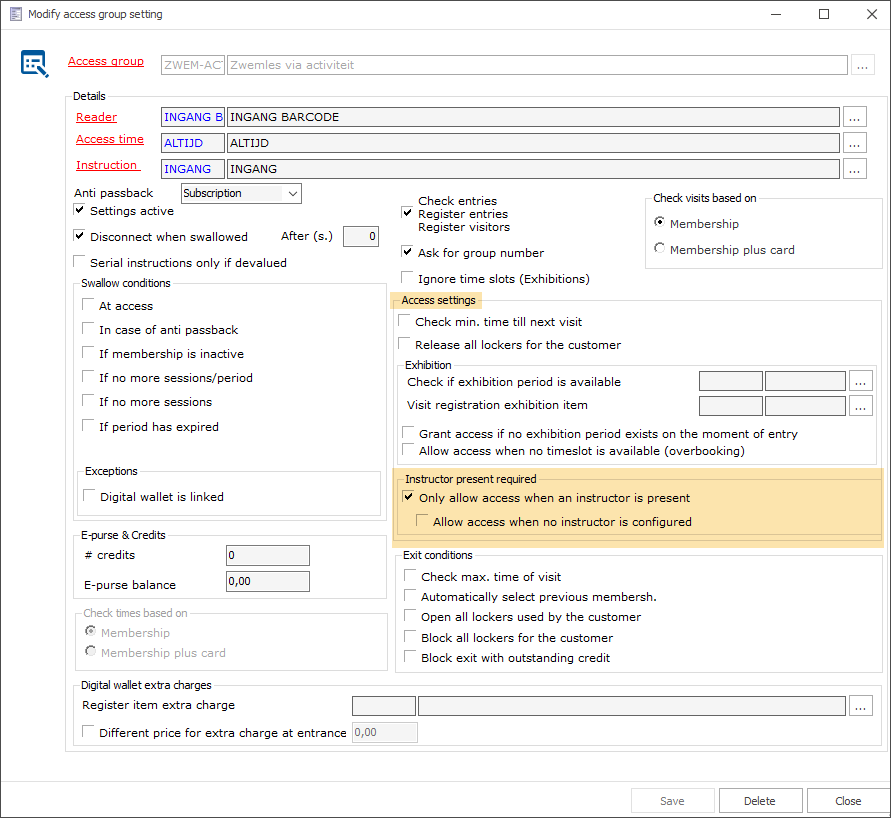
Only allow access when an instructor is present (Default: disabled): When enabled, participants can only pass through access control if their instructor has already badged in.
Allow access when no instructor is configured (Default: disabled): An optional fallback that grants access on days where no instructor is linked to the activity. This setting only applies when the first option is enabled.
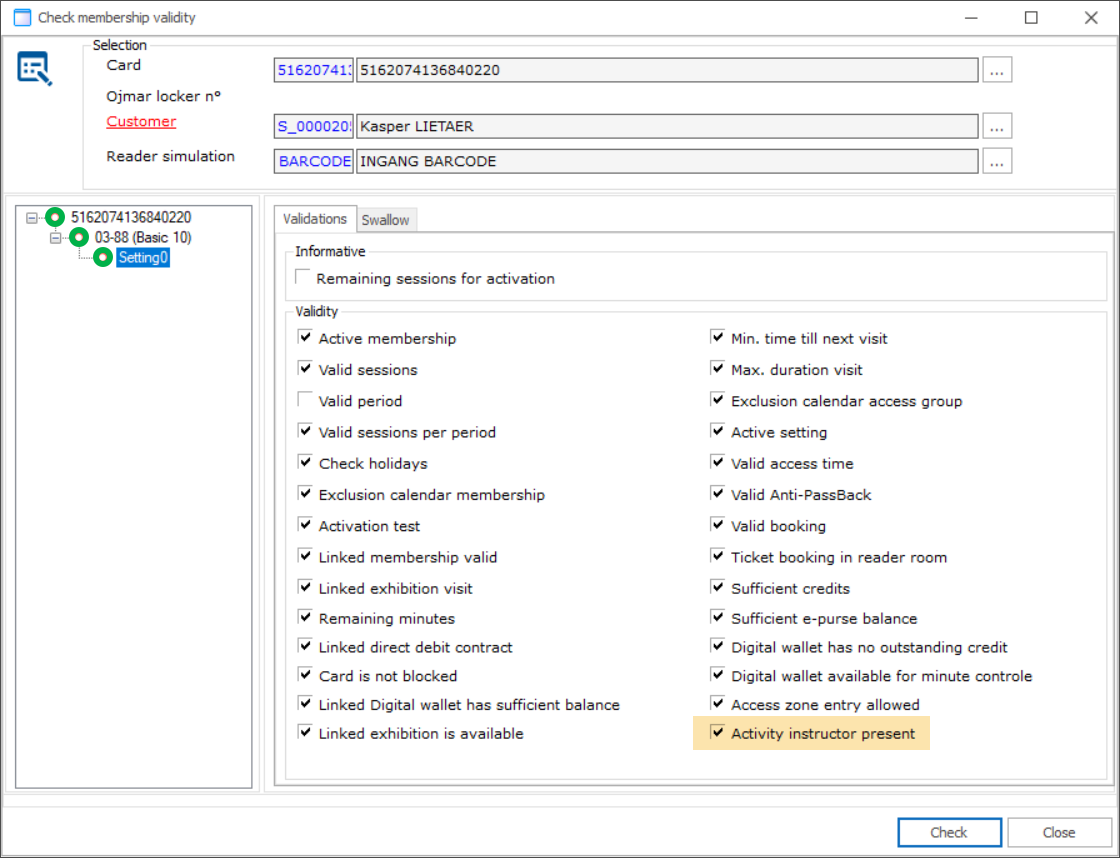
A new validity check, Activity instructor present, is now visible in the membership validity check tool in Recreatex backoffice.
Set up the activity with registration article(s) so that participants receive a membership upon registration.
Link instructors (employees) to the relevant activity days. The employee must have an existing address (customer account) linked.
In the access control settings for the relevant access group, enable Only allow access when an instructor is present (and optionally the fallback setting).
Ensure the instructor has a membership linked to the same access group as the students.
When a participant scans their card, the system checks whether the feature is active for the access zone linked to their membership. If it is, it looks up which instructor is assigned to that day's activity. If an instructor is assigned, the system verifies whether the instructor has already entered at the same access point.
If the instructor is present, access is granted.
If not, access is denied.
If no instructor is configured for that day, the outcome depends on the fallback setting Allow access when no instructor is configured: access is either granted or denied accordingly.
Integrations
Mercurius invoice export (new API integration)
Cipal Schaubroeck is a Belgian IT company that provides financial management software (Alfa / FoxBoek) to many municipalities, OCMWs, and police zones. These systems are connected to Mercurius, the Belgian government's central e-invoicing platform.
To replace the existing XML-based file exchange between Recreatex and the financial systems connected to Mercurius, a new REST API integration is being introduced. As the XML-based approach will be phased out over time, the new Recreatex plugin provides support for the API and ensures continued invoice export functionality for our customers.
To learn more about how to switch to the new integration, please contact your account manager.
Secure API connection: Data is exchanged via a secured API instead of file transfers, reducing the risk of data loss or interception.
Fully automated export: Once configured, invoices are exported automatically on each scheduled run, removing the need for manual file handling.
PDF export: Invoice PDFs can be included in the export, with customizable file names based on Recreatex fields (invoice number, customer name, date, OGM, etc.).
Manual export option: Export can also be triggered manually, filtered by invoice number range or date range.
Automatic retry & error notifications: Failed invoices are automatically retried in the next run. You receive an email overview of any failures with the reason, so nothing gets lost.
Configurable per division: The plugin is fully configurable per division, including connection settings, Mercurius-specific parameters, and error email settings.
API changelog
Date | Type | Method | Summary | Internal reference |
|---|---|---|---|---|
23 Feb 2026 | Add |
|
| BACKOFFICE-27387 |
03 Mar 2026 | Change |
|
| IOT-1344 |
03 Mar 2026 | Change |
|
| IOT-1344 |
04 Mar 2026 | Change |
|
| BACKOFFICE-27834 |
13 Mar 2026 | Cange |
|
| BACKOFFICE-27917 |
13 Apr 2026 | Add |
|
| BACKOFFICE-28130 |
19 May 2026 | Edit | ListPaymentMethods |
| BACKOFFICE-28351 |