Configure the sales lists
The Vintia Order Kiosk supports two types of sales lists:
Regular sales list: At least one sales list is mandatory. It contains all articles available for sale via the kiosk. If you are working with two sales zones, you may want to create separate sales lists for each, depending on your sales concept (e.g., Eat in and Take out).
Upselling sales list: This optional list enables an additional feature in the kiosk. After the customer clicks Next to proceed to checkout, the kiosk displays a selection of extra articles, encouraging additional purchases.
Note
To create a sales list, you can find detailed instructions in the Recreatex Online Help under POS > POS - Management > Settings > Sales lists.
Both regular and upselling sales lists are created as sales lists in the Recreatex backoffice, but each type is linked to the sales zone through a separate configuration field, as they serve distinct functions within the kiosk flow.
You can add articles to the relevant sales lists during the article configuration (article card) or by directly editing the sales list:
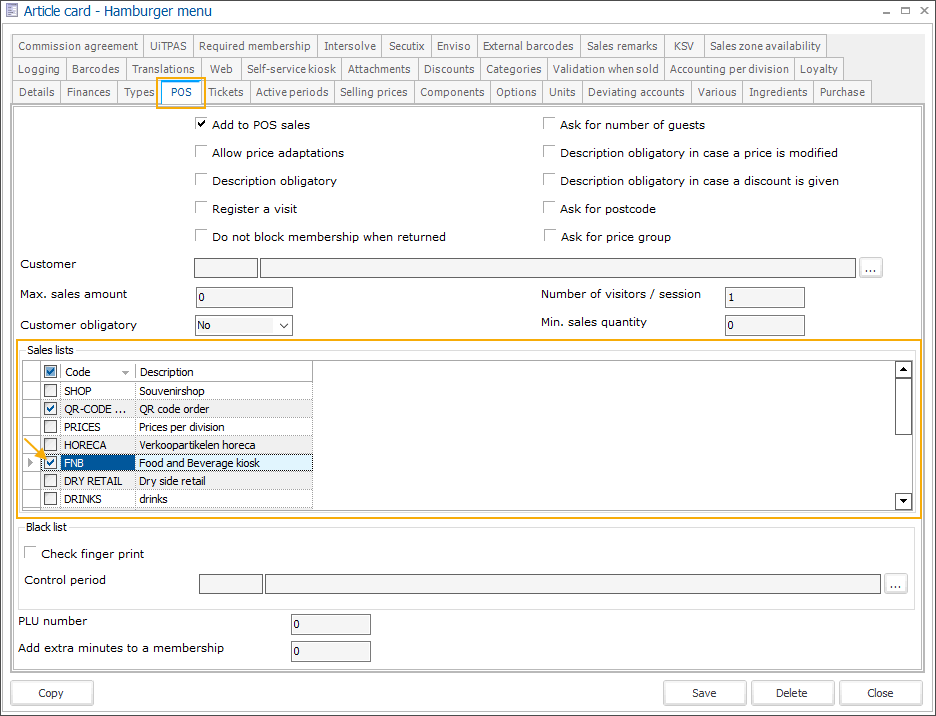
Go to General > Basic data > Articles > Articles, then open the article card. In the tab POS, under the section Sales lists, select the sales list where you want to add the article.
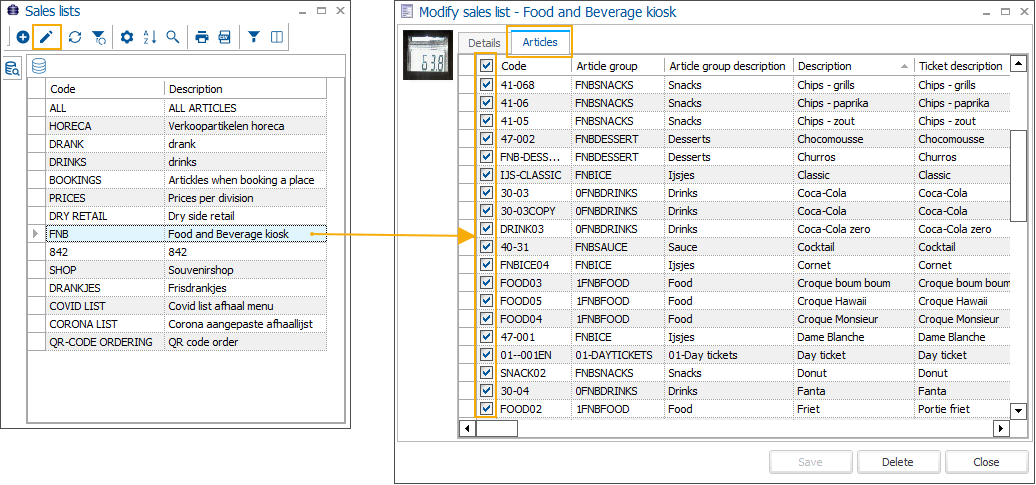
Go to POS > Settings > Sales lists and open the relevant sales list. In the tab Articles, select all articles that should be included in this sales list.