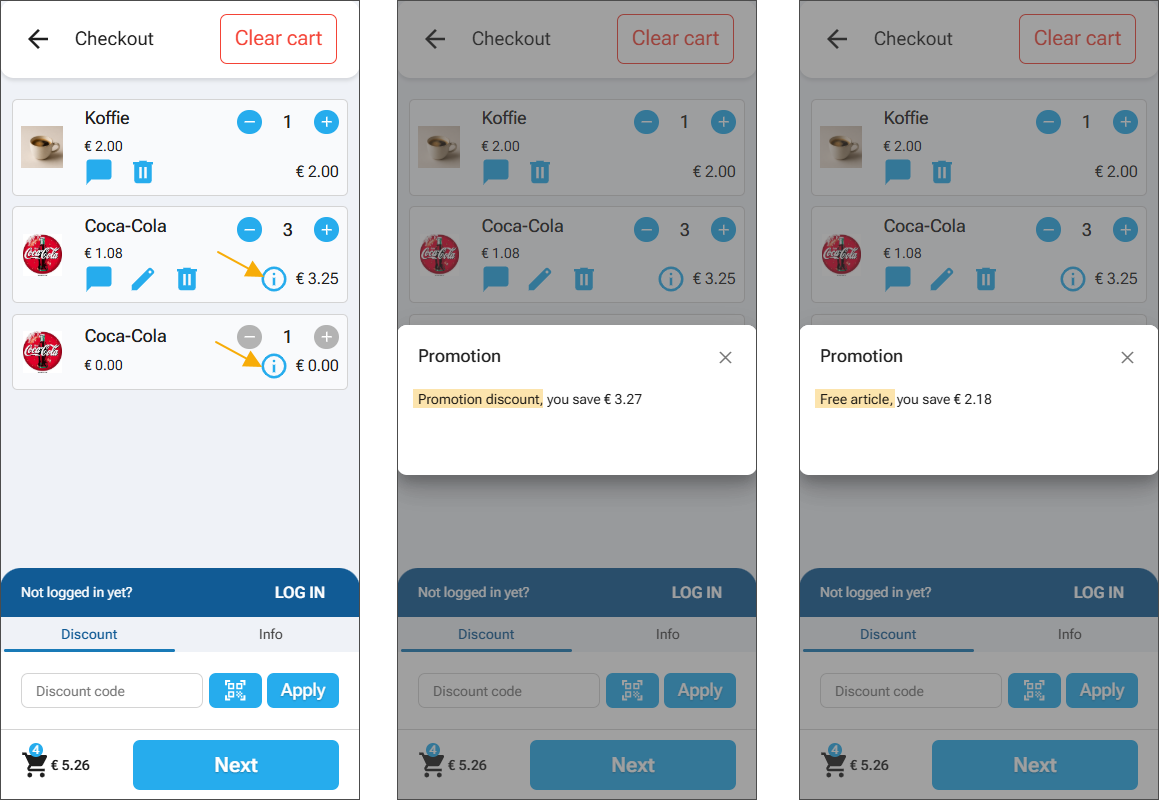
Vintia Order App & Kiosk | Support for Recreatex promotion rules We have made several adjustments to ensure Recreatex promotion rules are applied and processed correctly across both the Order Kiosk and App. Customers can now benefit from automatic discounts, special deals, and promotional items directly during checkout. Automatic promo calculations: Configured promotion rules are automatically applied based on the current basket contents and recalculated whenever items are added, removed, or quantities are updated. Supported promotion types include percentage discounts, fixed-amount reductions, fixed prices, free items, and buy X/pay Y deals. Promotion info in basket: An information icon ( ) has been added next to discounted or promotional items in the basket. Tapping the icon opens a pop-up with details of the applied benefit (e.g., promotion discount or free item). ) has been added next to discounted or promotional items in the basket. Tapping the icon opens a pop-up with details of the applied benefit (e.g., promotion discount or free item). Free item validation & checkout handling: Free items (€0) are now handled correctly during basket validation and checkout. Whether the €0 price is displayed or hidden, basket totals and order processing remain accurate.
Cross-selling optimisation: Cross-selling suggestions are now retrieved more efficiently across both the app and kiosk, reducing unnecessary data transfers and improving loading performance. Consistent product counter display: Menu items with options now also display their basket quantity directly on the product tile, making it easier to track selections while browsing the menu.
|
Vintia Order Kiosk | Accessibility improvements As part of our ongoing commitment to digital accessibility and inclusive user experiences, this release introduces key enhancements to our JAWS screen reader integration. These updates deliver smoother navigation, real-time voice announcements during ordering, and accurate multi-language support across the kiosk interface. Language selection: Language tags have been added to all language selection buttons and dropdown options, ensuring the screen reader correctly detects and announces each language option, including Arabic, using proper speech pronunciation rules. Screen titles: When a screen loads (such as Start, Eat in / Take out, Menu, Item options, and Kiosk closed), focus now automatically moves to the screen heading so the reader immediately reads out its title and instructions. Heading navigation for primary actions: Primary action buttons (such as View order, Checkout, Next, and Add to basket) are now marked as headings, allowing customers using the screen reader to jump directly to key actions via heading navigation shortcuts without tabbing through every element on the screen. Category carousel: Categories are now directly accessible when navigating the carousel. Category names are announced when focused, while navigation arrows are skipped. Browsing between categories no longer loads the article list until a category is selected. Product overview navigation: Selecting a category now automatically moves focus to the first product tile, allowing customers to start browsing the menu immediately. When a product tile receives focus, the screen reader announces the item name and price, while skipping detailed descriptions and other tile elements during navigation. Item options: When selecting item options (such as sizes or extras), option group headings are now accessible for the reader via heading navigation, including step progress information (such as "Step 1 of 3"). In addition, option tiles announce the option name, price, and current selection status, providing immediate voice feedback when options are selected or deselected. Shopping cart updates: When an item is added to or removed from an order, the screen reader now automatically announces the item name and confirmation toast, providing immediate voice feedback without requiring the customer to move focus.
The Kiosk now supports availability periods configured on article subcategories, providing greater control over product availability by applying a single schedule to all products in the relevant kiosk menu category. Automatic category-based availability: When a category becomes unavailable, all products in that category are marked as unavailable and cannot be selected. Basket validation for unavailable products: If a product becomes unavailable after being added to the basket, basket validation prevents checkout and informs the customer which product is no longer available for sale. Filtered cross-selling suggestions: Products that are currently unavailable are automatically excluded from cross-selling suggestions and are not displayed as recommendations.
|