Vintia Order Kiosk | Toast notifications have been redesigned to make feedback messages easier to notice and interact with. The notifications are now displayed centred above the footer. A countdown progress bar indicates the remaining display time before the notification closes automatically. Notifications can be dismissed either by clicking the X button or by clicking anywhere on the toast message. The redesigned notifications use the Vintia feedback colour scheme.
Updated the kiosk timeout warning setting label in F&B Manager to Time-out warning (shown for x seconds) to clearly indicate how long the countdown pop-up is displayed before the kiosk returns to the homepage. Improved payment error handling for digital wallets where the credit limit has not yet been activated in Recreatex: Customers are shown a clear message directing them to seek assistance from an employee. The kiosk remains on the payment screen, allowing customers to select an alternative payment method instead of entering out-of-service mode.
|
Vintia Order App & Kiosk | Order Kiosk and App now support cross-selling suggestions, allowing you to display more relevant product recommendations based on the customer's current basket selection and encourage additional purchases. Cross-selling suggestions take priority when available. Additional suggestions (sales list) can serve as a fallback when no cross-selling suggestions are available. Additional suggestions and cross-selling suggestions can be tracked using separate conversion tracking events.
We have implemented support for Czech (CS) and Spanish (ES), including translated interface labels, language selection, and the ability to customise translations for both languages via the translations page in F&B Manager. Note: Article descriptions for Czech will be possible as of the Recreatex 8.6.3.0 release (September 2026). Added several new animated loading spinners for the Kiosk and App, giving venues more options to personalise their ordering experience. Order Kiosk and App now handle fee registration articles linked to promotion rules more accurately in the basket: Displayed as non-editable basket lines, showing the article name, image, price, and total amount. Excluded from the basket item count. Price group discounts are no longer applied.
|
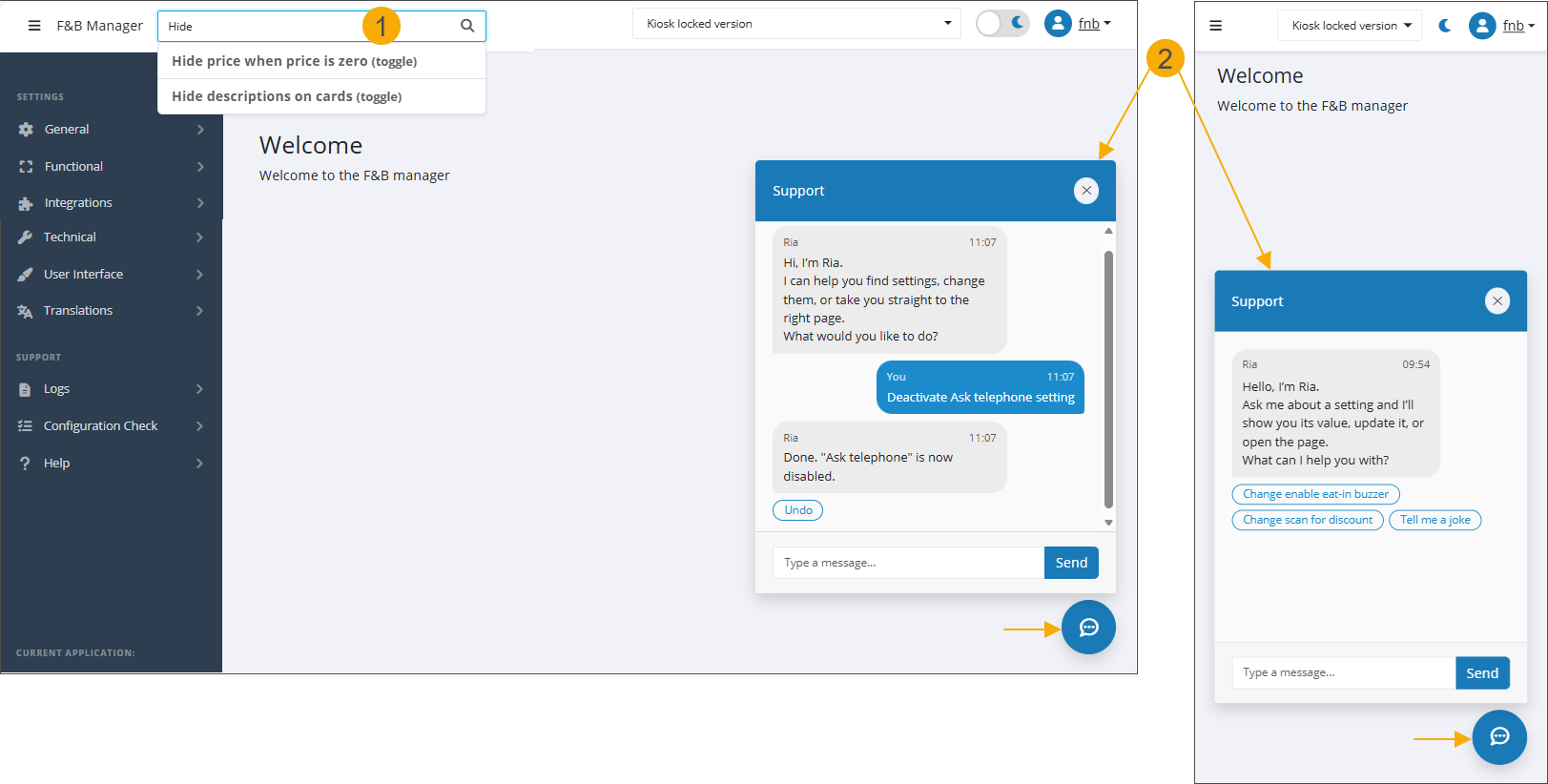
F&B Manager | You can now preview the animated loading spinners directly in F&B Manager before applying any to the Order App or Kiosk. The F&B Manager now offers two quick ways to find and manage settings without browsing through the setting categories in the sidebar: Search bar (1): located in the top bar (tablet and larger screens only). Quickly find any setting by name and navigate directly to its page from the search results. Support assistant (2): A built-in chat assistant available from any page in F&B Manager, on all screen sizes including mobile. Find and manage settings without leaving your current screen.
Shop ID creation now supports cloning existing shop settings. Superuser can create a new Shop ID by copying configuration from an existing shop, including general, technical, look & feel, functional, integration, and custom configuration settings. Sensitive credentials such as passwords, keys, certificates, and device-specific IoT IDs are not copied.
Shop management improvements Shop names: If a name is configured for a shop (tab Technical), it is now displayed throughout the F&B Manager instead of the GUID, making shop identification easier for all users. If no name is configured, the GUID is used as a fallback. Zones & organisations (superuser only): Create and manage zones and organisations from the new Shop management page in F&B Manager. Shops can be grouped into zones, which in turn can be grouped into organisations. Assigning a user to a zone or organisation automatically grants access to all shops within that group. Adding a new shop to a zone automatically grants all users with access to the zone access to that shop. When modifying settings for a shop assigned to a zone, you can choose whether the changes apply only to that shop or to all shops in the zone.
Trailing spaces in configuration fields (e.g. URLs) are now automatically trimmed on save in the F&B Manager, preventing integration errors caused by accidental whitespace.
|
Order Display | |
Kitchen Display | |