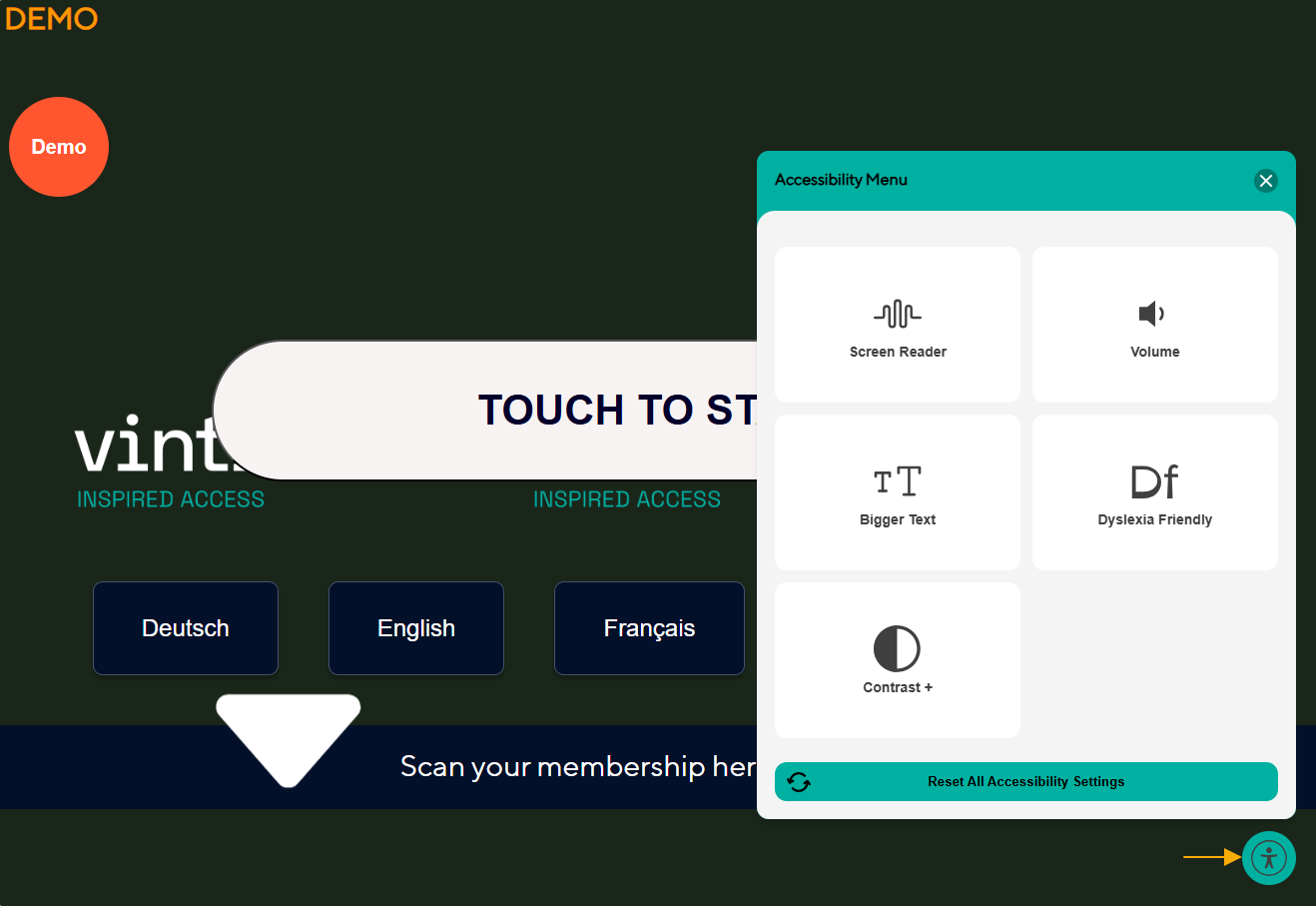
Vintia Order Kiosk | Accessibility button & menu (WCAG compliance) A new accessibility button has been added to the kiosk screen to comply with WCAG guidelines. Tapping the button opens an accessibility menu with the following options: Screen reader: Enables a built-in screen reader, allowing users to navigate the kiosk without external assistive technology. When active, the kiosk switches from single-tap to double-tap interaction. The first tap selects an item and reads it aloud; the second tap confirms the action. Runs seamlessly in the background with no visible program windows. The screen reader and volume controller require the IoT screen reader plugin to be installed and configured in the F&B Manager.
Volume: Adjusts the screen reader volume via the accessibility menu or the physical buttons on the STORM device. Four levels available: default (60%), level 1 (75%), level 2 (90%), and level 3 (100%). Audio automatically switches to headphones when plugged in via the headphone jack and back to the built-in speakers when unplugged.
Bigger text: Increases the font size across the entire kiosk up to 200% for improved readability. Multiple zoom levels are available via the accessibility menu. All actions available at 100% remain fully accessible at 200%. Some screens may require vertical scrolling to reach all content. Works in combination with the dyslexia-friendly font setting. The accessibility menu itself is not affected by the zoom level.
Dyslexia friendly: Switches the kiosk to a font designed with extra detail in letterforms (Atkinson Hyperlegible) to reduce common reading errors. Letter spacing and word spacing are also increased for better readability. Contrast: Toggle between three contrast modes to improve visibility for visually impaired or colour-blind users: Invert colours: Inverts all colours on screen except the accessibility menu itself. Dark contrast: Uses dark backgrounds with light text and borders for maximum contrast. Light contrast: Subtle adjustments to the home screen for a softer contrast. In dark and light mode, large homepage images are hidden to remove low-contrast visual noise.
All accessibility settings automatically reset when the user completes or exits the order flow. User interactions with the menu are logged for auditing purposes. The Quit button now also appears on the kiosk order confirmation screen when automatic receipt printing is enabled, allowing customers to exit the screen immediately.
|
Vintia Order App | The app has been upgraded to .NET 10.0 to ensure continued performance, security, and long-term support. The login page now displays the configured loading spinner during sign-in, providing visual feedback and preventing unnecessary clicks. Google Pay is now available as a payment method in the app.
|
Vintia Order App & Kiosk | We have implemented Arabic language support for the kiosk and app, including translated interface labels, language selection, and the ability to customize Arabic translations via the translations page in F&B Manager. Note: Right-to-left layout is not yet included and will follow in a future release.
|
Order Display | |
Kitchen Display | |