Recreatex 8.5.2
What's new in Recreatex 8.5.2
Recreatex - Enviso integration |
|
POS |
|
Activities |
|
Sales admin |
|
Webshop | |
Self-service kiosk |
|
F&B Solution |
|
Neue Versionen und Anmerkungen
Das Recreatex 8.4.2.0 Release enthält die Entwicklungs- und internen Optimierungstickets der folgenden Anwendungen und ihrer jeweiligen Versionen:
Recreatex 8.4.2.0
Recreatex WSDL 8.4.2.0
Recreatex WEBSHOP 6.4.2.0
Recreatex BKO (Kinderbetreuung) Web App 6.4.2.0
Recreatex LLV (Instructor) web app 6.4.2.0
Recreatex Selbstbedienungsterminal 6.4.2.0
Recreatex F&B Kiosk
Recreatex QR ordering app
Recreatex Driver 8.4.2.0
Recreatex Web-Aufgaben 8.4.2.0
Recreatex Plugin Framework 8.4.2.0
Wichtig
As of version 8.5.0.0, all Web applications follow the versioning of Recreatex backoffice, transitioning directly from the previous version 6.4.2.0 to 8.5.0.0.
Recreatex version support
Volle Unterstützung: Recreatex 8.4.0.X / 6.4.0.X und höher
Minimale Unterstützung: Recreatex 8.3.0.X / 6.3.0.X, 8.3.1.X / 6.3.1.X, 8.3.2.X / 6.3.2.X
Important reminders
Microsoft hat den Support für Office 2003 und Office 2007 eingestellt. Wir empfehlen Ihnen, auf Office 2016 zu aktualisieren, das von Microsoft bis zum 14. Oktober 2025 unterstützt wird.
Ab Version 7.1.0 benötigt Recreatex .NET 4.7.2. Wir empfehlen Ihnen, Ihre Systeme entsprechend zu aktualisieren.
Die Mindestanforderung für die SQL Server-Software ist jetzt SQL Server 2016. Wir haben unsere Mindest- und empfohlenen Anforderungen für die SQL Server-Software aktualisiert, um optimale Leistung, Stabilität, Funktionalität und Sicherheit zu gewährleisten. Falls Sie dies noch nicht getan haben, empfehlen wir Ihnen, auf SQL Server 2016 oder höher zu aktualisieren, um neuere Versionen von Recreatex auszuführen.
New features
Recreatex
Activities | |||
|---|---|---|---|
Customer ticket | Description | Version | Internal reference |
Added the possibility to define a work type on the activity level, which overrules the default work type from the activity parameters when creating employee tasks. | 8.5.2.0 | BACKOFFICE-26543 | |
Implemented the possibility to use composed articles as registration articles for an activity. | 8.5.2.0 | BACKOFFICE-26553 | |
Extended exhibition counters to support tracking of activity registrations. (Activities module implementation) | 8.5.2.0 | BACKOFFICE-26557 | |
Extended exhibition counters to support tracking of activity registrations. (configuration) | 8.5.2.0 | BACKOFFICE-26636 | |
Extended exhibition counters to support tracking of activity registrations. (counter logic) | 8.5.2.0 | BACKOFFICE-26637 | |
Database | |||
Customer ticket | Description | Version | Internal reference |
Optimised query plan for pSubscriptionsGetListByAddressCardCustomerID to improve performance when loading membership data. | 8.5.2.0; 8.4.0.5; 8.5.0.3; 8.4.1.11; 8.4.2.7; 8.5.1.1 | BACKOFFICE-25549 | |
Event planning | |||
Customer ticket | Description | Version | Internal reference |
When using a payment method with enabled payment remarks, users are now prompted to enter remarks when invoicing, cancelling, or recording advance payments for an event file in the backoffice. | 8.5.2.0 | BACKOFFICE-25981 | |
Facility bookings | |||
Customer ticket | Description | Version | Internal reference |
Added improvements to the mailing functionality when sending booking confirmations, including the option to configure CC/BCC email addresses and use dynamic placeholders (e.g. [FirstName], [Name]) based on the customer info from the first facility booking in the email subject and body. | 8.5.2.0 | BACKOFFICE-25985 | |
Season planning: Added an option to provide feedback when approving, declining, or changing a season planning proposal. | 8.5.2.0 | BACKOFFICE-26535 | |
Framework | |||
Customer ticket | Description | Version | Internal reference |
Introduced a new DevExpress grid with live scrolling that can be reused across multiple Windows Forms screens. | 8.5.2.0 | BACKOFFICE-26458 | |
The "All Memberships" form now uses the new DevExpress grid with support for filtering, paging, quick search, and calculated fields. | 8.5.2.0 | BACKOFFICE-26584 | |
The Memberships tab on the AddressForm now uses the new DevExpress grid with paging, filtering, and selection updates for improved performance and usability. | 8.5.2.0 | BACKOFFICE-26585 | |
New DevExpress grids with live scrolling have been implemented in all forms where the stored procedure pDivisionCardsGetListAddressCardsByAddress is used. | 8.5.2.0 | BACKOFFICE-26621 | |
All Recreatex applications are now digitally signed with a certificate. | 8.3.2.X; 8.3.1.X; 8.3.0.X; 8.4.0.X; 8.4.1.X; 8.4.2.X; 8.5.1.X; 8.5.0.X; 8.5.2.0 | BACKOFFICE-27051 | |
The Outlook integration in Recreatex was updated to use Microsoft Graph API instead of Exchange Services (EWS), without affecting the calendar functionality. | 8.3.2.X; 8.3.1.X; 8.3.0.X; 8.4.0.X; 8.4.1.X; 8.4.2.X; 8.5.1.X; 8.5.0.X; 8.5.2.0 | BACKOFFICE-27052 | |
LLV (Instructor website) | |||
Customer ticket | Description | Version | Internal reference |
API: Extended the attendance details in the student info section by adding information about absence in level, diploma-related attendance, and total lessons not taken. | 8.5.2.0 | BACKOFFICE-26455 | |
Other | |||
Customer ticket | Description | Version | Internal reference |
Added integration with Oracle Hospitality Integration Platform to allow hotel guests to use venue services and have their expenses charged to their hotel invoice, improving convenience and guest experience. | 8.5.2.0 | BACKOFFICE-26511 | |
POS | |||
Customer ticket | Description | Version | Internal reference |
Implemented a new employee-level setting to ensure that only cashiers authorised to make representation expenses appear in the selection list at the POS when using the payment method intended for representation expense purchases. | 8.5.2.0 | BACKOFFICE-25774 | |
Enviso promotions on both basket and offer levels are now supported when sold via Recreatex POS, with correct visualisation across all POS and exhibition layouts. | 8.5.2.0 | BACKOFFICE-25949 | |
Implemented support for Enviso group offers with a ticket per group and group offers with a ticket per person. | 8.5.2.0 | BACKOFFICE-26084 | |
Added support to retrieve and pay for Enviso "pay later" ticket orders at the Recreatex POS, with the sale automatically registered in Recreatex and the order confirmed in Enviso upon payment. | 8.5.2.0 | BACKOFFICE-26085 | |
Implemented the possibility to apply Enviso discount codes when selling Enviso offers (synced from Recreatex) through the Recreatex POS. | 8.5.2.0 | BACKOFFICE-26315 | |
Sorteerstraatjes: Added input validation to the counter plugin card field, allowing only numeric values from 1 to 9999999 with a maximum of 12 digits, and disabling the OK button when validation is not met. | 8.5.1.X MP; 8.4.1.X MP; 8.4.2.X MP; 8.4.0.X MP; 8.5.0.X MP; 8.5.2.0 | BACKOFFICE-26384 | |
Implemented the possibility to scan or enter an Enviso order number in the following POS extra functions: - Find order: retrieves the corresponding sale. - Find exhibition visit: retrieves the related exhibition visits for the selected date. | 8.5.2.0; 8.4.2.8; 8.5.0.3; 8.5.1.1 | BACKOFFICE-26429 | |
Added an option to modify the auto-generated card number to assign a ticket to an existing customer card. | 8.5.2.0 | BACKOFFICE-26437 | |
Added the TSE_Description field to ExternalMappings to retrieve and store the TSE description in the ReCreateX database. | 8.5.2.0; 8.5.1.2 | BACKOFFICE-26536 | |
Combi exhibitions: We have improved date selection for combi exhibitions in POS by showing timeslots for each subsequent exhibition around the date chosen in the first step, rather than showing the first available period again. | 8.5.2.0 | BACKOFFICE-26540 | |
Replaced the card lookup box with a DevExpress grid across multiple forms to improve performance and usability when searching for customer cards. | 8.5.2.0 | BACKOFFICE-26560 | |
Recreatex - Enviso integration | |||
Customer ticket | Description | Version | Internal reference |
TradeFlow: Modified the plugin to import and create unknown Enviso articles in Recreatex, enabling their sales to be registered and processed. | 8.5.2.0 | BACKOFFICE-24380 | |
Sales admin | |||
Customer ticket | Description | Version | Internal reference |
CSC-151961 | Improved the performance of closing collection periods and added a progress bar to show ongoing progress. | 8.5.2.0; 8.5.1.0 | BACKOFFICE-26060 |
Added extra fields to the invoice layout to display FDM2.0 communication control data when available. | 8.5.2.0; 8.5.1.2 | BACKOFFICE-26507 | |
Added support for CAMT.053 bank statement files in Recreatex, replacing the obsolete MT940 format while keeping all existing functionality compatible. | 8.5.2.0 | BACKOFFICE-26685 | |
SydAdmin | |||
Customer ticket | Description | Version | Internal reference |
Increased the maximum length of the SMTP password field from 50 to 100 characters. | 8.5.2.0 | BACKOFFICE-26537 | |
System | |||
Customer ticket | Description | Version | Internal reference |
A new Blocking setting has been added to the rate-limiting configuration, allowing rate limits to be enabled for monitoring purposes without actively blocking requests. | 8.5.2.0 | BACKOFFICE-25926 | |
Implemented syncing of cancellation fees from Enviso to ensure accurate financial registration. | 8.5.2.0 | BACKOFFICE-25957 | |
Webshop | |||
Customer ticket | Description | Version | Internal reference |
API: Redesigned exhibition tickets and extra options layout by converting list items into cards, improving visual structure and usability. | 8.5.2.0; 8.5.1.0 | BACKOFFICE-26033 | |
A demo mode has been added to the NMBS integration, allowing mocked data to be used in development and testing. | 8.5.2.0; 8.5.1.0; 8.4.0.5; 8.5.0.3; 8.4.1.11; 8.4.2.7 | BACKOFFICE-26413 | |
API: You can now show a map of the activity location on the detail page, using the coordinates configured at the Activity level in Recreatex backoffice. | 8.5.2.0 | BACKOFFICE-26550 | |
API: Improved the change password functionality, ensuring users are prompted to update their password after first login when it is created or updated in Backoffice. | 8.5.2.0 | BACKOFFICE-26558 | |
Activities: Exhibition counters configured for activities now also take into account registrations made via the webshop. | 8.5.2.0 | BACKOFFICE-26953 | |
Activities: Expanded the search function of the Activities module to include information from the fields: detailed description, location, organisation, care type, and activity type, making it easier for users to find relevant activities. | 8.5.2.0 | BACKOFFICE-26452 | |
Webshop
Activities | |||
|---|---|---|---|
Customer ticket | Description | Version | Internal reference |
Added an option to adjust occupancy percentage thresholds so that colour indicators better reflect actual availability levels. | 8.5.2.0 | WEBAPP-8318 | |
Activities configured as UiTPAS activities in Recreatex now show an UiTPAS logo in the webshop overview, so customers can see this information while browsing without opening the detail of each activity. | 8.5.2.0 | WEBAPP-8779 | |
Updated registration logic to allow customers to register for available day parts of an activity, even when other day parts are full, by checking free places per day part rather than at the activity level. | 8.5.2.0 | WEBAPP-8814 | |
You can now show a map of the activity location on the detail page, using the coordinates configured at the Activity level in Recreatex backoffice. | 8.5.2.0 | WEBAPP-8817 | |
Bookings (Facility bookings) | |||
Customer ticket | Description | Version | Internal reference |
Implemented automatic sending of cancellation emails for facility bookings using a configurable email template. | 8.5.2.0 | WEBAPP-8776 | |
Season planning: Added an option to provide feedback when approving, declining, or changing a season planning proposal. | 8.5.2.0 | WEBAPP-8815 | |
Exhibitions (Timeslot ticketing) | |||
Customer ticket | Description | Version | Internal reference |
Redesigned exhibition tickets and extra options layout by converting list items into cards, improving visual structure and usability. | 8.5.2.0 | WEBAPP-8689 | |
Updated the "My exhibitions" overview to hide the cancel button when an advance payment exists, preventing cancellation of visits that already have payments. | 8.5.2.0 | WEBAPP-8785 | |
Combi exhibitions: We have improved date selection for combi exhibitions by showing timeslots for each subsequent exhibition around the date chosen in the first step, rather than showing the first available period again. | 8.5.2.0; 8.5.1.4 | WEBAPP-8849 | |
Moved the side banner HTML in the Exhibitions module to a deeper level to avoid it taking up the full width of the page. | 8.5.2.0 | WEBAPP-8864 | |
Redesigned the ticket selection page layout, introduced a default ticket icon, and added a manager setting to optionally hide ticket images. | 8.5.2.0 | WEBAPP-8934 | |
General | |||
Customer ticket | Description | Version | Internal reference |
CSC-140363 | Improved support for custom banner images in the webshop header and added recommended dimensions to the manager to ensure proper image display. | 8.5.2.0 | WEBAPP-8309 |
Increased the size of the EnvisoPayPayments status column to 100 characters to support more descriptive status naming. | 8.5.2.0 | WEBAPP-8332 | |
Disabled direct image pasting in RadEditors (except for email templates) to avoid high memory usage from large image files. | 8.5.2.0 | WEBAPP-8391 | |
CSC-148520 | Improved webshop license validation by enforcing module access checks and showing a blocking message if required licenses are missing. | 8.5.2.0 | WEBAPP-8472 |
Configured default buttons for most pages across the webshop to ensure expected behaviour when pressing Enter. | 8.5.2.0 | WEBAPP-8585 | |
WCAG 2.1 compatibility: Extended keyboard navigation to include the Account menu, allowing users to reach the Account menu options via the tab key when logged out. | 8.5.2.0; 8.5.1.X MP; 8.5.0.X MP | WEBAPP-8667 | |
WCAG 2.1 compatibility: The "View" option for the basket in the old webshop layout is now accessible with the tab key when an item is in the basket. | 8.5.2.0; 8.5.1.X MP; 8.5.0.X MP | WEBAPP-8670 | |
WCAG 2.1 compatibility: Repositioned the login button lower in the form to ensure users tab through key options before logging in. | 8.5.2.0; 8.5.1.X MP; 8.5.0.X MP | WEBAPP-8672 | |
WCAG 2.1 compatibility: Added an ARIA label to the delete button in the basket popup to ensure it is interpreted correctly by screen readers. | 8.5.2.0; 8.5.1.X MP; 8.5.0.X MP | WEBAPP-8675 | |
WCAG 2.1 compatibility: Linked the subtext for the Remember me checkbox on the login form to the checkbox using ARIA attributes to improve accessibility. | 8.5.2.0 | WEBAPP-8676 | |
WCAG 2.1 compatibility: The text fields for entering username and password now include screenreader-friendly ARIA attributes to indicate errors when input is incorrect. | 8.5.0.4; 8.5.2.0; 8.5.1.X MP | WEBAPP-8694 | |
WCAG 2.1 compatibility: Improved the colour contrast when focusing on a numeric box in the membership overview in the old webshop layout. | 8.5.0.4; 8.5.2.0; 8.5.1.X MP | WEBAPP-8707 | |
WCAG 2.1 compatibility: Added roles and captions to several tables to ensure they are correctly interpreted by screen readers. | 8.5.0.4; 8.5.2.0; 8.5.1.X MP | WEBAPP-8709 | |
WCAG 2.1 compatibility: Added meaningful summary attributes to all RadGrid tables in the webshop to improve accessibility for screen readers. | 8.5.0.4; 8.5.2.0; 8.5.1.X MP | WEBAPP-8711 | |
Disabled password autocomplete on relevant input fields to prevent browsers from caching credentials. | 6.4.0.5; 6.4.1.10; 6.4.2.8; 8.5.0.4; 8.5.2.0; 8.5.1.X MP | WEBAPP-8783 | |
Improved the change password functionality, ensuring users are prompted to update their password after their first login when it is created or updated in Backoffice. | 8.5.2.0 | WEBAPP-8816 | |
Gezinsbond: Set the default amount to redeem to 0 instead of the maximum possible value. | 8.5.2.0; 8.5.1.X MP; 6.4.1.X MP; 6.4.2.X MP; 8.5.0.X MP | WEBAPP-8858 | |
Changed all references from Passbook to Wallet across the webshop, including images, variable names, and translations. | 8.5.2.0 | WEBAPP-8868 | |
Added an option to show ticket price on Apple Wallet tickets. | 8.5.2.0 | WEBAPP-8869 | |
WCAG 2.2. AA compatibility: Updated the alt text of the Recreatex Webshop logo. | 8.5.2.0 | WEBAPP-8875 | |
WCAG 2.2. AA compatibility: The profile menu can now be closed using the Escape key. | 8.5.2.0 | WEBAPP-8879 | |
WCAG 2.2. AA compatibility: Added a skip link to allow keyboard users to bypass repeated content and jump directly to the main content. | 8.5.2.0 | WEBAPP-8880 | |
WCAG 2.2. AA compatibility: All webshop pages now display unique, descriptive titles in the browser tab, making navigation clearer for users who rely on screen readers. | 8.5.2.0 | WEBAPP-8881 | |
WCAG 2.2. AA compatibility: Improved keyboard navigation by making focus indicators visible and ensuring all interactive elements are reachable and usable with the Tab and Enter keys. | 8.5.2.0; 8.5.1.X MP; 8.5.0.X MP | WEBAPP-8882 | |
Added an option in the webshop manager to replace the default cookie banner with custom HTML, requiring user confirmation to acknowledge responsibility for compliance. | 8.5.2.0; 8.5.1.X MP; 8.5.0.X MP | WEBAPP-8884 | |
Fixed naming inconsistencies in contact address fields. | 8.5.2.0; 6.4.2.X; 6.4.0.X; 6.4.1.X; 8.5.1.X; 8.5.0.X | WEBAPP-8895 | |
Gezinsbond: The redeem button now only appears when applicable, with a pop-up triggered on click and card balance shown after applying. | 8.5.2.0; 8.5.3.0 | WEBAPP-8910 | |
Manager | |||
Customer ticket | Description | Version | Internal reference |
General: A confirmation dialogue was added to the delete action in User management to prevent accidental account deletion. | 8.5.2.0 | WEBAPP-6973 | |
A warning is now shown in the Manager when the Secure cookies setting is turned off, informing users that this may cause the webshop to malfunction. | 8.5.2.0 | WEBAPP-8415 | |
Extended the CloneWebShop stored procedure in the Manager database to allow a custom ShopID for the cloned webshop. | 8.5.2.0 | WEBAPP-8658 | |
Added a button on the Statebags page to visualise the basket XML in a pop-up. | 8.5.2.0 | WEBAPP-8697 | |
Membership | |||
Customer ticket | Description | Version | Internal reference |
WCAG 2.1 compatibility: Enabled tab key navigation to the compact filters section on the membership overview for improved accessibility. | 8.5.2.0; 8.5.1.X MP; 8.5.0.X MP | WEBAPP-8668 | |
WCAG 2.1 compatibility: Set the focus on the first radio button when the Add relation pop-up opens. | 8.5.2.0; 8.5.1.X MP; 8.5.0.X MP | WEBAPP-8671 | |
WCAG 2.1 compatibility: Removed an empty h2 element from MyFamily.aspx. | 8.5.2.0; 8.5.1.X MP; 8.5.0.X MP | WEBAPP-8673 | |
WCAG 2.1 compatibility: Updated the Family and Family members labels to proper header elements. | 8.5.2.0; 8.5.1.X MP; 8.5.0.X MP | WEBAPP-8674 | |
Implemented a mobile-friendly "My memberships" overview in the new UI, ensuring all columns and membership details are visible the same way as in the desktop view. | 8.5.2.0 | WEBAPP-8789 | |
Added a new setting to calculate the end date of a direct debit contract based on the notice settings and display it in a pop-up when a customer cancels a membership with a direct debit contract on the Webshop. | 8.5.2.0 | WEBAPP-8794 | |
Other | |||
Customer ticket | Description | Version | Internal reference |
Implemented a plugin to send webshop sales to the Eparagony API in real time and email digital fiscal receipts to customers once the receipt status is confirmed. | 8.5.2.0 | WEBAPP-8841 | |
WSDL
Activities | |||
|---|---|---|---|
Customer ticket | Description | Version | Internal reference |
API: Added support in the API for customers to provide existing card IDs during activity registration, allowing memberships to be linked to their existing cards. | 8.5.2.0 | BACKOFFICE-26402 | |
API: The FindActivities call now returns only activities that match all skills specified in SkillSubCategoryIdList. | 8.5.2.0; 8.5.1.5 | BACKOFFICE-26647 | |
Document service | |||
Customer ticket | Description | Version | Internal reference |
The Document Service now sets the Content-Disposition header for each PDF document, ensuring that files are downloaded by the browser instead of being opened in a new tab. | 8.5.2.0 | BACKOFFICE-24762 | |
Added new fields to the e-ticket document service to display OrganisedVisitPriceGroup prices alongside existing SalesLines-based price fields, ensuring accurate pricing visibility on e-tickets. | 8.5.2.0 | BACKOFFICE-26506 | |
F&B Kiosk | |||
Customer ticket | Description | Version | Internal reference |
API: Implemented an optional sales list, allowing the kiosk to display a selection of additional articles at checkout to encourage extra purchases. | 8.5.2.0 | BACKOFFICE-26244 | |
Facility bookings | |||
Customer ticket | Description | Version | Internal reference |
API: Added contact person details from the booking to the booking confirmation document. | 8.5.2.0 | BACKOFFICE-26528 | |
General | |||
Customer ticket | Description | Version | Internal reference |
Ticket description is now available via the API and can be added to e-tickets using the ticketTicketDescription merge field in the e-ticket template. | 8.5.2.0 | BACKOFFICE-26768 | |
LLV (Instructor website) | |||
Customer ticket | Description | Version | Internal reference |
API: When transferring a lesson group, the list of target lesson groups is now sorted by diploma, with lesson groups matching the diploma of the group being transferred shown first. | 8.5.2.0 | BACKOFFICE-26523 | |
API: Added a checkbox to the transfer screen to only show fully assessed students in the selected lesson group. | 8.5.2.0 | BACKOFFICE-26527 | |
API: Added a pop-up to notify instructors when a student has completed all norms in the current level and can be transferred to the next. | 8.5.2.0 | BACKOFFICE-26531 | |
Membership | |||
Customer ticket | Description | Version | Internal reference |
API: Added a new setting to calculate the end date of a direct debit contract based on the notice settings and display it in a pop-up when a customer cancels a membership with a direct debit contract on the Webshop. | 8.5.2.0 | BACKOFFICE-26566 | |
CSC-177119 | Added high-level DEBUG logs with timestamps to the DevaluateSubscription endpoint using Log4Net to trace code paths and help identify performance issues. | 8.5.2.0; 8.4.0.X; 8.4.1.X; 8.4.2.X; 8.5.1.X; 8.5.0.X | BACKOFFICE-26897 |
Added DEBUG logs with timestamps to the Devaluate() method within the DevaluateSubscription endpoint using Log4Net to trace code paths and help identify performance issues. | 8.4.0.X; 8.4.1.X; 8.4.2.X; 8.5.1.X; 8.5.0.X; 8.5.2.0 | BACKOFFICE-26966 | |
mStock | |||
Customer ticket | Description | Version | Internal reference |
API: A new DeleteJournalLines endpoint has been implemented to enable proper deletion of journal lines, rather than using a workaround of setting their quantity to zero. | 8.5.2.0 | BACKOFFICE-25696 | |
QR ordering app | |||
Customer ticket | Description | Version | Internal reference |
API: The app now correctly supports availability per category, allowing articles to be marked as available or not depending on the category they are shown in. | 8.5.2.0 | BACKOFFICE-26634 | |
Improved article list loading speed by optimising the FindSalesZoneArticles query and related data handling to reduce initial caching time and enhance performance. | 8.4.1.X; 8.4.2.X; 8.5.1.X; 8.5.0.X; 8.5.2.0 | BACKOFFICE-26986 | |
Sales admin | |||
Customer ticket | Description | Version | Internal reference |
Added DivisionID to the FindSales API response to include division-level information for each sale. | 8.5.2.0 | BACKOFFICE-26513 | |
Self-service kiosk | |||
Customer ticket | Description | Version | Internal reference |
Self-service kiosk: Exhibitions and their tickets can now be displayed in the order defined by relevance settings configured at the point of sale level in the backoffice. | 8.5.3.0; 8.5.2.0 | BACKOFFICE-26974 | |
Swimming courses | |||
Customer ticket | Description | Version | Internal reference |
Added LessonGroups and LessonGroupStudents endpoints to the Recretex webservice. | 8.5.2.0 | BACKOFFICE-26541 | |
TaskFlow | |||
Customer ticket | Description | Version | Internal reference |
API: The EntryNota property has been added to the EntryParticipant object in the response of the GetActivityDayParticipants API call, enabling the retrieval and update of notes associated with a participant’s registration. | 8.5.2.0 | BACKOFFICE-23460 | |
API: Added Target group and Remarks fields to the FindEmployeeTasks method for employee tasks related to exhibition visits. | 8.5.2.0 | BACKOFFICE-26588 | |
Added a workgroup-level setting to restrict adjusting or removing availability within a configurable number of days before the start date. | 8.5.2.0 | BACKOFFICE-26956 | |
Timeslot ticketing | |||
Customer ticket | Description | Version | Internal reference |
Added support for filtering and retrieving exhibitions based on required employee skills in the FindExpositions API. | 8.5.2.0; 8.5.1.5 | BACKOFFICE-26571 | |
CSC-179633 | Applied employee capacity logic to the FindExhibitionPeriodDates endpoint to align availability checks with the ListExhibitionPeriods SQL procedure and resolve inconsistencies in exhibition period filtering. | 8.5.2.0 | BACKOFFICE-26991 |
Webshop | |||
Customer ticket | Description | Version | Internal reference |
NMBS integration: Updated GetProducts request to include TravelerType.Unknown to resolve API errors caused by missing traveller type information. | 8.5.2.0; 8.4.0.X; 8.4.1.X; 8.4.2.X; 8.5.1.X; 8.5.0.X | BACKOFFICE-26893 | |
F&B Solution
F&B Kiosk | |||
|---|---|---|---|
Customer ticket | Description | Version | Internal reference |
Implemented an optional sales list, allowing the kiosk to display a selection of additional articles at checkout to encourage extra purchases. | 8.5.2.0 | FNB-242 | |
WCAG 2.1 AA compatibility: Improvements on the kiosk's Options page include clearer image descriptions for screen readers and better keyboard navigation through options lists. | 8.5.2.0 | FNB-298 | |
Introduced an optional setting that allows the category carousel in the F&B Kiosk to automatically scroll to the middle category when the product overview screen loads. | 8.5.2.0 | FNB-315 | |
Improved the loading speed of the article list in the F&B Kiosk by optimising image handling, significantly enhancing performance over Wi-Fi and in the browser. | 8.5.2.0 | FNB-326 | |
Accessibility: Adjustments were made to the article selection screen to improve keyboard navigation and screen reader support, enabling users to select articles, access the membership scan area, and interact with the basket more effectively. | 8.5.2.0 | FNB-341 | |
Added an optional setting to improve the readability of article names that exceed the two-line limit on article cards by applying a scrolling marquee animation. | 8.5.2.0 | FNB-344 | |
Accessibility: Adjustments were made to the options selection screen to improve tab order, maintain layout consistency during navigation, and prevent access to the hidden shopping cart element. | 8.5.2.0 | FNB-345 | |
Accessibility: Adjustments were made to the payment screen to ensure the confirmation message after successful payment is read aloud by the screen reader, improving feedback for users during checkout. | 8.5.2.0 | FNB-346 | |
Accessibility: Adjustments were made to the confirmation screen to ensure the order number is read aloud by the screen reader, providing clear feedback to users after order completion. | 8.5.2.0 | FNB-347 | |
CSC-178479 | Added logging of visited URLs accessed by the kiosk to enhance traceability and support diagnostics. | 8.5.2.0 | FNB-361 |
QR ordering app | |||
Customer ticket | Description | Version | Internal reference |
The app now supports the same closure logic as the kiosk, configured in the F&B Manager, ensuring a consistent closed status across both interfaces. | 8.5.2.0 | FNB-158 | |
Increased the logo size on the app screen by removing the border radius and height restrictions. | 8.5.2.0 | FNB-316 | |
Improved the loading speed of the article list in the app by optimising image rendering. | 8.5.2.0 | FNB-325 | |
CSC-172342 | The app now supports the same closure logic as the kiosk, configured in the F&B Manager, ensuring a consistent closed status across both interfaces. | 8.5.2.0 | FNB-327 |
The app now correctly supports availability per category, allowing articles to be marked as available or not depending on the category they are shown in. | 8.5.2.0 | FNB-329 | |
You can now allow your customers to pay using the Apple Pay option via the Enviso Pay gateway. | 8.5.2.0 | FNB-339 | |
Added a new setting to make table selection mandatory in the app, enforcing validation and error handling when no table is scanned. | 8.5.2.0 | FNB-352 | |
F&B Kiosk / QR ordering app | |||
Customer ticket | Description | Version | Internal reference |
Added support for local time zones in the F&B Kiosk and QR ordering app, allowing opening hours and availability settings to reflect the client’s actual time zone instead of the server time. | 8.5.2.0 | FNB-317 | |
Added article sorting based on relevance defined at the point-of-sale level. | 8.5.2.0 | FNB-324 | |
Self-service kiosk
Customer ticket | Description | Version | Internal reference |
|---|---|---|---|
Configuration tool: Renamed several EID-related settings to provide more descriptive labels and reduce ambiguity. | 8.5.2.0; 8.5.1.X MP; 6.4.1.X MP; 6.4.2.X MP; 6.4.0.X MP; 8.5.0.X MP | WEBAPP-7638 | |
Configuration tool: Added an option to disable e-mail functionality to prevent errors for customers who do not use e-mail notifications. | 8.5.2.0 | WEBAPP-7690 | |
Implemented a module-specific custom pop-up to display a configurable image at the end of payment transactions, with a fallback general image when no module-specific image is set. | 8.5.2.0 | WEBAPP-8652 | |
Applied the default scan image setting consistently across all locations to allow showing a relevant carrier image (e.g. card or bracelet), improving clarity for customers during scanning. | 8.5.2.0 | WEBAPP-8825 | |
Improved keyboard navigation and screen reader support by making UI elements focusable and ensuring proper labelling where needed. | 8.5.2.0; 8.5.1.X MP; 8.5.0.X MP | WEBAPP-8863 | |
Exhibitions and their tickets can now be displayed in the order defined by relevance settings configured at the point of sale level in the backoffice. | 8.5.2.0; 8.5.3.0 | WEBAPP-8883 | |
Implemented session timer reset on key press events to prevent unexpected session timeout during keyboard navigation. | 8.5.2.0; 8.5.1.X MP; 8.5.0.X MP; 8.5.3.0 | WEBAPP-8922 |
LLV (Instructor website)
Customer ticket | Description | Version | Internal reference |
|---|---|---|---|
Extended the attendance details in the student info section by adding information about absence in level, diploma-related attendance, and total lessons not taken. | 8.5.2.0 | WEBAPP-8782 | |
Added a checkbox to the transfer screen to only show fully assessed students in the selected lesson group. | 8.5.2.0 | WEBAPP-8795 | |
Added a pop-up to notify instructors when a student has completed all norms in the current level and can be transferred to the next. | 8.5.2.0 | WEBAPP-8802 | |
When transferring a lesson group, the list of target lesson groups is now sorted by diploma, with lesson groups matching the diploma of the group being transferred shown first. | 8.5.2.0 | WEBAPP-8803 | |
Added a pop-up to alert instructors when transferring a student who is also part of another active lesson group. | 8.5.2.0 | WEBAPP-8805 | |
Updated lesson group selection labels and their translations in English, French, and Dutch to improve clarity: All lessons, All lessons for today, My lessons, My lessons for today. | 8.5.2.0 | WEBAPP-8806 |
Interface framework
Customer ticket | Description | Version | Internal reference |
|---|---|---|---|
ReCreateX.AX7: Added the DiscountAmount field to the plugin's export interface so that sales line discounts can be exported as absolute amounts in addition to percentages. | 8.4.1.2; 8.5.0.1; 8.5.2.0; 8.4.2.2; 8.5.1.1 | PLUGINS-2292 | |
BrControlsExport: Extended the plugin's export logic to include employee badges based on a configurable card definition and default activity. | 8.5.2.0 | PLUGINS-2272 | |
CounterPlugin.OracleOpera: The plugin enables Recreatex POS to send guest charges directly to Oracle Opera’s hotel management system using its API. | 8.5.2.0 | PLUGINS-2307 | |
FNAC integration: The FNAC ticket import plugin was updated to support sequential processing of different ticket types, resolving workflow conflicts caused by simultaneous API calls. | 8.5.0.1; 8.5.2.0; 8.5.1.1 | PLUGINS-2314 | |
GED_SkidataConnector.Plugin: The plugin was extended to support parking ticket validation by mapping Skidata status codes and checkpoints to Recreatex access groups. | 8.5.2.0 | PLUGINS-2287 | |
CounterPlugin.GroupCheckIn: Added a new POS extra function, Group check-in, to automatically check in groups by pulling up a sale or receipt. | 8.5.2.0 | PLUGINS-2264 | |
SAG.Plugin.EparagonyExport.Plugin: Implemented a plugin to send webshop sales to the Eparagony API in real time and email digital fiscal receipts to customers once the receipt status is confirmed. | 8.5.2.0 | PLUGINS-2288 | |
Sag.Plugin.ScenarioExport: The plugin now fetches only sessions within a specified date range and based on parameter values indicating whether to include completed sessions, approved sessions, and non-automatic exports, improving performance and reducing database load. | 8.5.2.0 | PLUGINS-2232 | |
Sag.Plugin.StorecoveEInvoicing: Added an option to skip PDF export, allowing compatibility with custom layouts and avoiding errors for customers who do not use the generated PDF. | 8.5.2.0; 8.5.0.3; 8.5.1.3 | PLUGINS-2301 | |
SAG.Plugin.TimeEdit: The plugin was updated to improve booking handling, email logic, and QR code generation for access control. | 8.4.1.1; 8.4.2.1; 8.5.0.1; 8.5.2.0; 8.5.1.1 | PLUGINS-2256 | |
TradeFlow: Implemented syncing of cancellation fees from Enviso to ensure accurate financial registration. | 8.5.2.0 | PLUGINS-2281 | |
TradeFlow: Modified the plugin to import and create unknown Enviso articles in Recreatex, enabling their sales to be registered and processed. | 8.5.2.0 | PLUGINS-2298 | |
WebshopParquesInterfacePlugin: Adjusted the existing plugin to enhance customer matching, store the transaction number in Subscriptions.ExtraInfo1 field, support ticket ID processing, and improve the customer import flow. | 8.4.2.1; 8.5.0.1; 8.5.2.0; 8.5.1.1 | PLUGINS-2244 |
Detailed information
POS: Apply Enviso discount codes when selling tickets for Enviso offers
Exhibitions created in Recreatex and synced to Enviso can now be sold through the Recreatex POS with Enviso discount codes applied during the sale.
Initial setup
An exhibition configured in Recreatex and synchronised to Enviso as an Enviso offer.
Promotions (discount codes) created in Enviso.
The Recreatex counter plugin ReCreateX.CounterPlugin.Enviso enabled in the Recreatex POS module.
Example
For our Enviso offer (exhibition) Autumn games and aperotime, two ticket types are available for sale via the Recreatex cash register:
Adult ticket: €48
Senior ticket: €45
We also have two Enviso discount codes possible for this event:
APERO25: Applies a 25% discount to the total basket price.
SENIOR5: Applies an additional €5 discount per senior ticket.
Additionally, we have created a Recreatex discount code named APERO25 intended exclusively for additional Recreatex articles added at the cash register during the ticket purchase process.
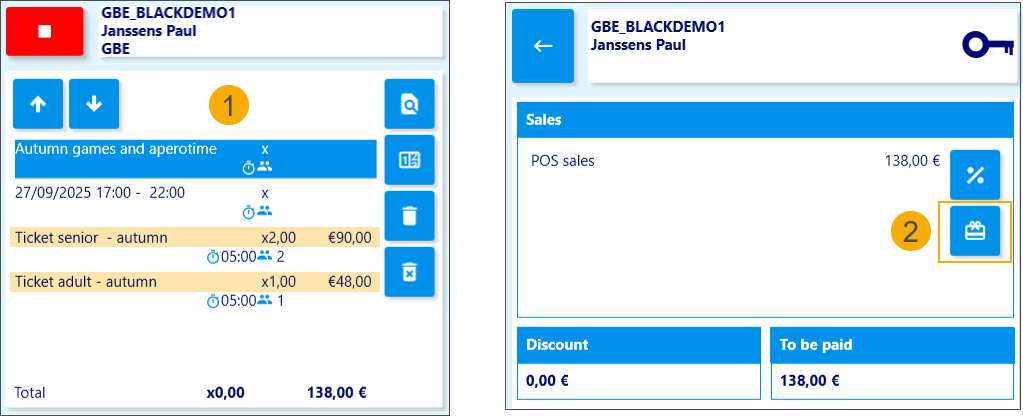
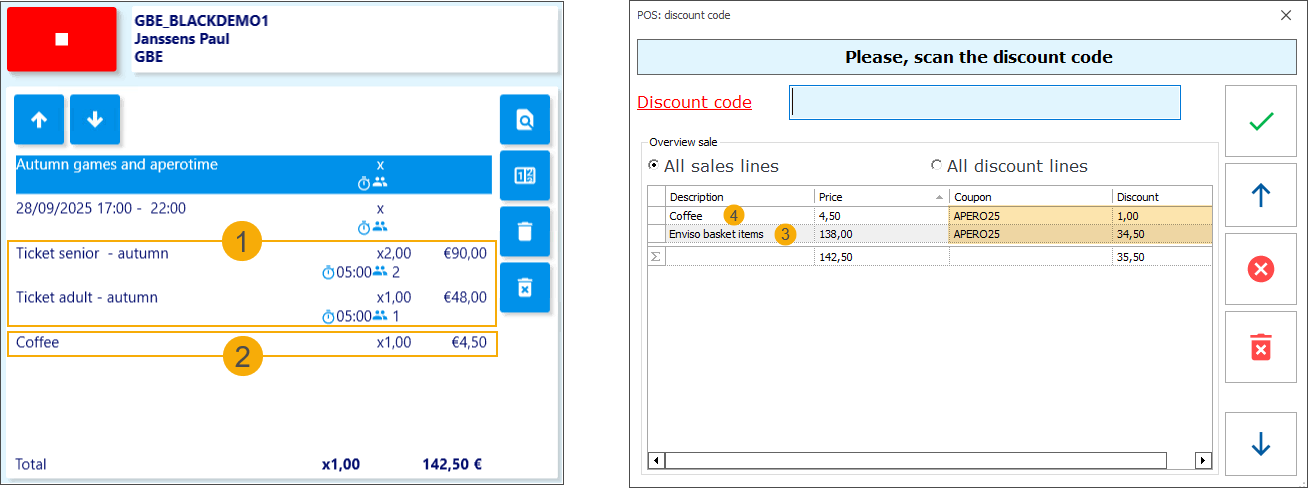
Our basket includes 1 adult ticket and 2 senior tickets. These are Enviso items (1), so the Enviso discount codes can be applied. The cashier clicks the discount code icon (2) to open the discount code screen.
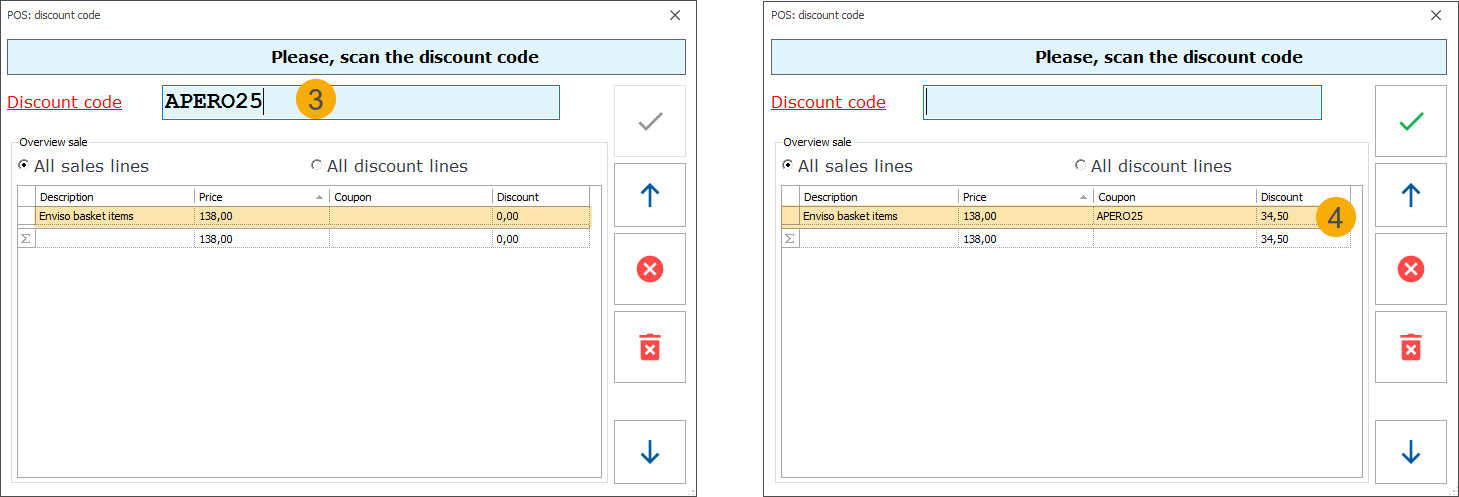
On the discount code screen, the cashier enters APERO25 (3) and applies the discount code by pressing the Tab key. The sales line updates to show the original price, the discount code name, and the discount amount (4).
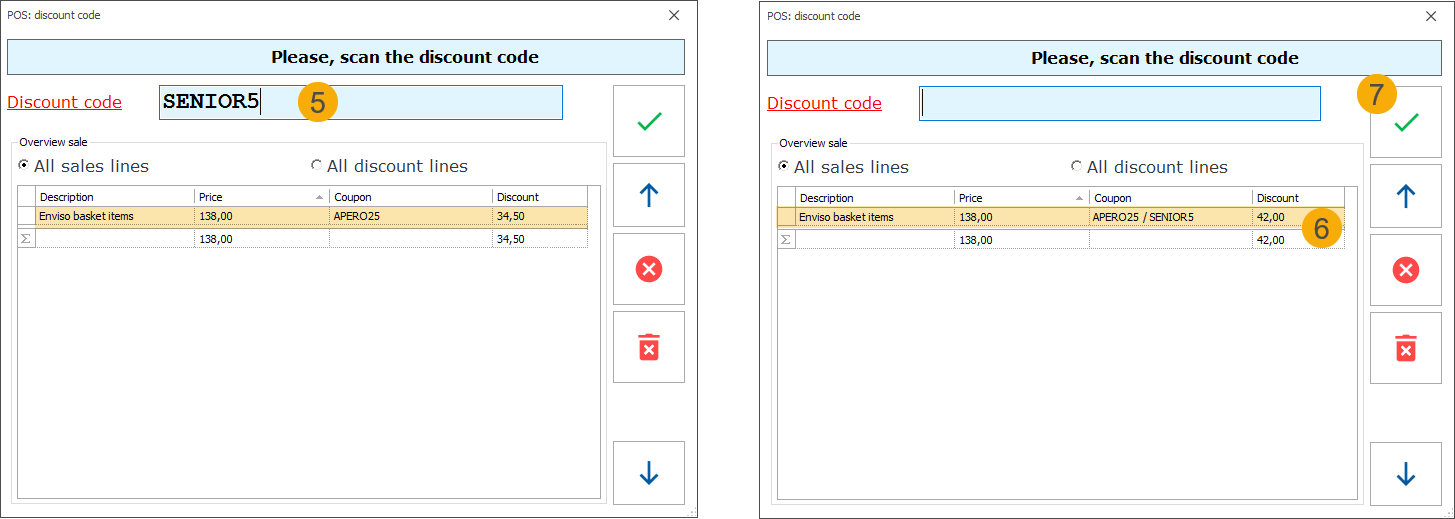
The same steps are followed to apply the second code, SENIOR5 (5). Once the discount codes are applied, the screen displays both coupon names and the updated total discount amount (6). The cashier clicks the green checkmark (7) to confirm the selection and return to the main screen.
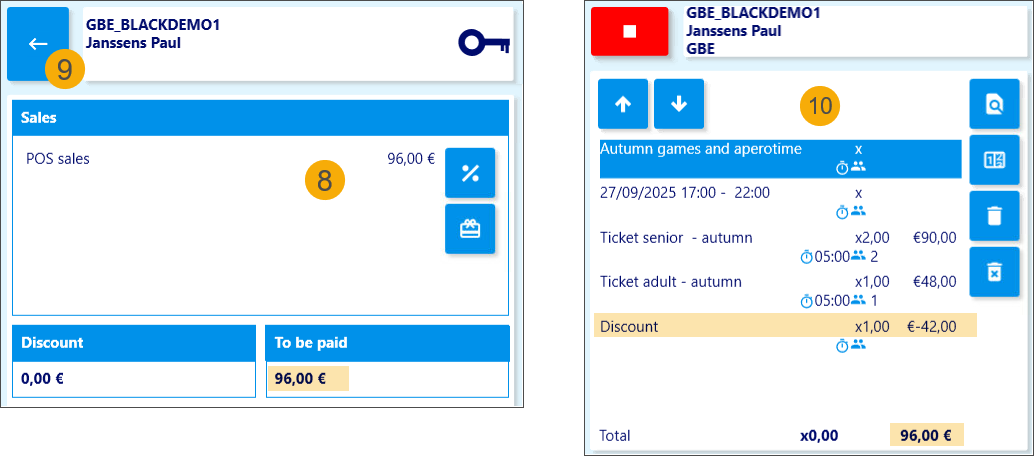
The total amount to be paid now reflects the applied discounts (8). By navigating back to the basket using the blue arrow (9), the cashier can view the original prices and the total discount amount (10).
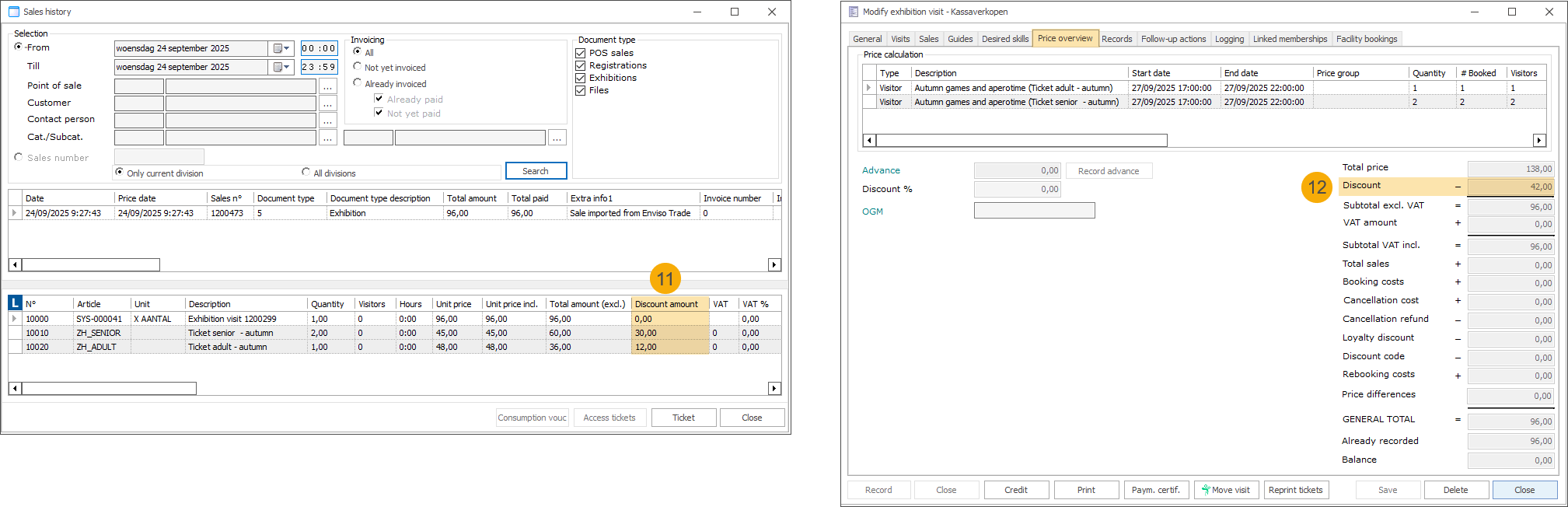
Once the payment is completed, the applied discounts are visualised in the sales history (11) and in the price overview of the exhibition visit (12) in the Recreatex backoffice.
If a discount code with the same name exists in both systems, it can be applied in the same way as described above. In our example, the discount code APERO25 was used, applying a 25% discount to the Enviso portion of the basket (1), and a Recreatex discount code with the same name provided a €1 discount on Recreatex items (2).
The system automatically checks the basket and applies each discount to the relevant items: the Enviso discount to Enviso products (3), and the Recreatex discount to Recreatex articles (4).
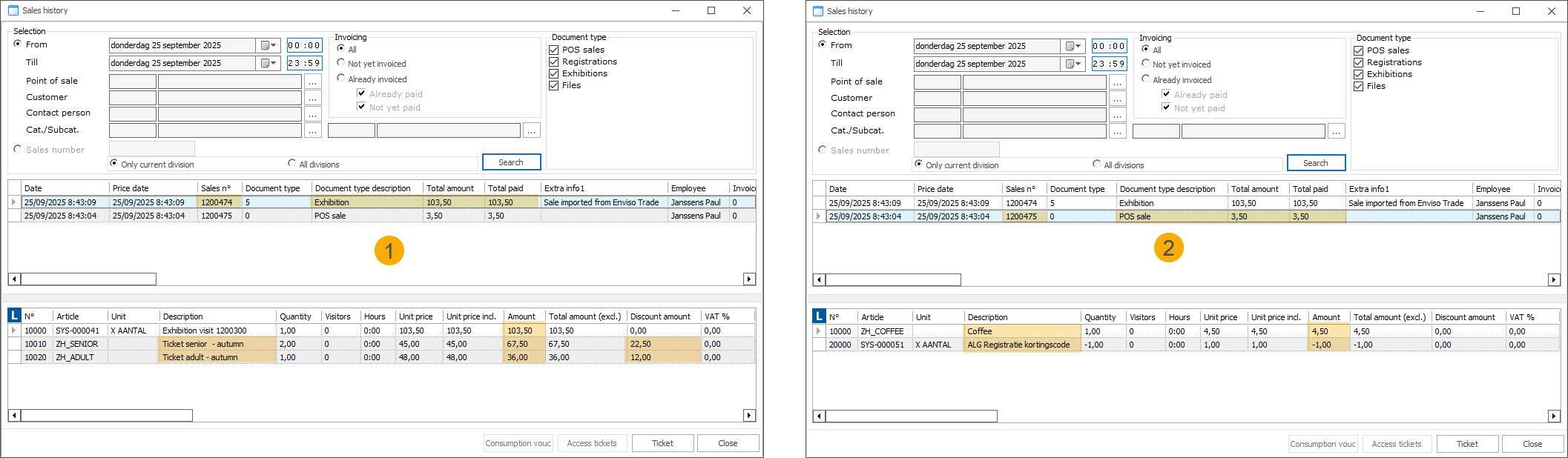
When discount codes from both Enviso and Recreatex are applied in a single transaction, the Recreatex sales history will show two separate sales lines: one for the Enviso exhibition tickets (1) and one for the Recreatex articles (2), each with its respective discount applied.
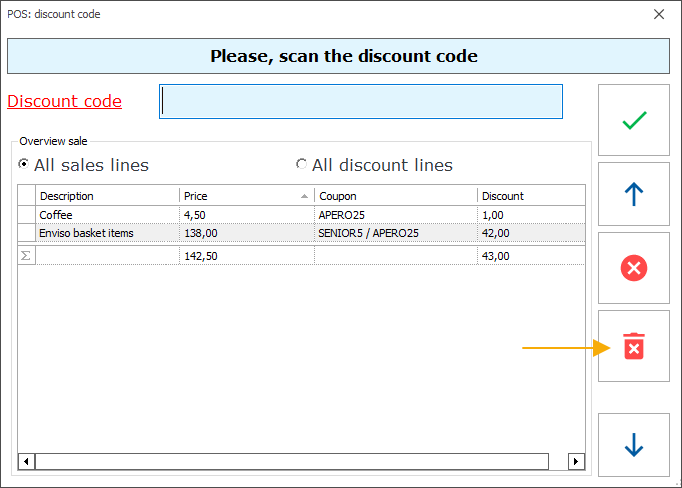
Individual Enviso discounts cannot be deleted. If a discount was applied by mistake, pressing the red trashcan button will remove all applied codes. You will then need to reapply only the discount codes you want to use.
POS: Handle Enviso "pay later" ticket orders at Recreatex POS
You can now retrieve and pay for Enviso "pay later" ticket orders directly at the Recreatex POS using a new extra function. Upon successful payment, the sale is automatically registered in Recreatex, and the order is confirmed in Enviso.
Initial setup
An exhibition configured in Recreatex and synchronised to Enviso as an Enviso offer.
The Pay later option must be enabled on the Enviso offer.
The Recreatex counter plugin ReCreateX.CounterPlugin.Enviso enabled in the Recreatex POS module.
Example
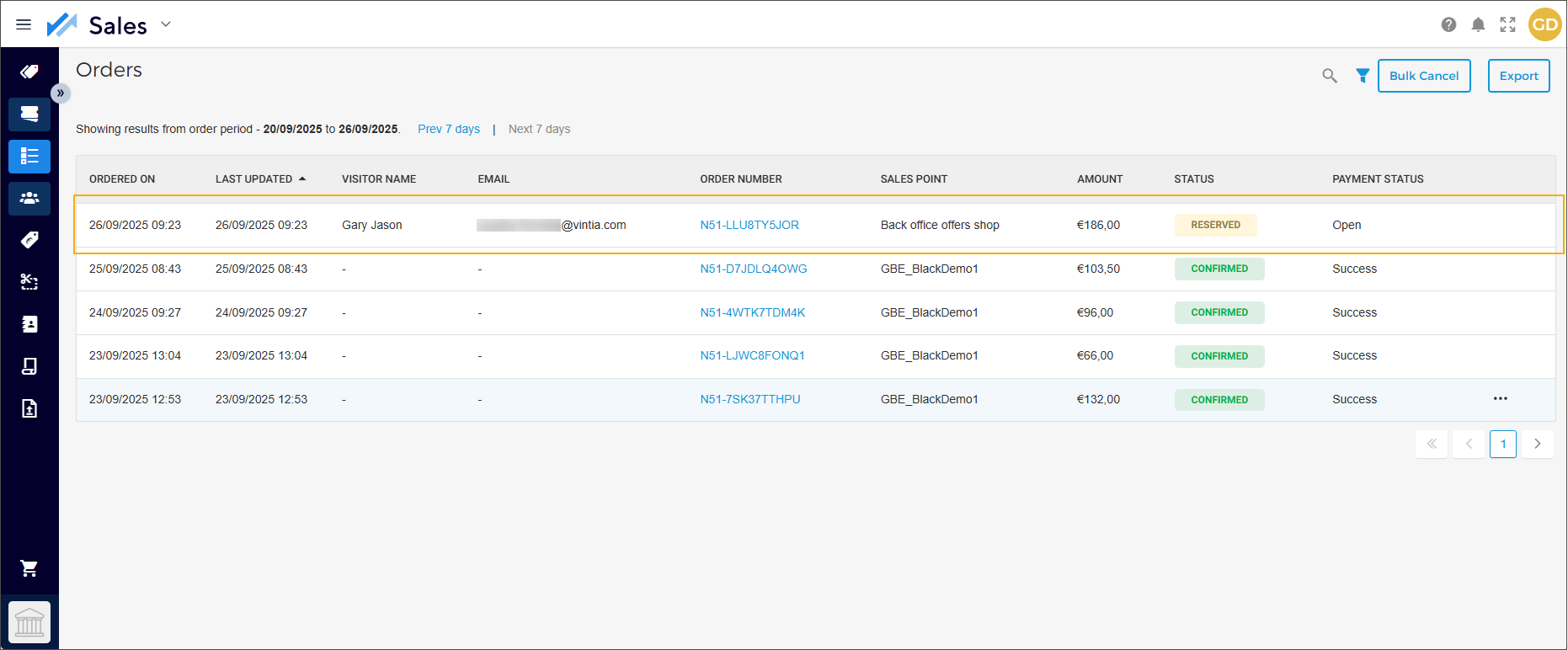
We have activated the Pay later option on our Enviso offer Autumn games and aperotime, and booked tickets via the Offers Shop. In Enviso, the order now has the status reserved, with the payment status set to open.
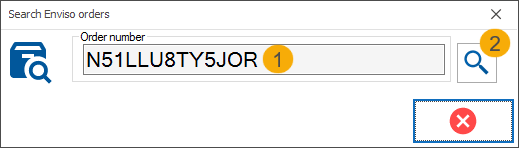
In Recreatex POS, the cashier navigates to extra functions  and clicks the button
  (Scan Enviso order number). A pop-up appears where the cashier can either scan the Enviso order number (if a scanner is available) or type it manually (1), press Tab and then click the search icon (2) to load the order into the POS basket.
Valid order is automatically loaded into the POS basket. (1)
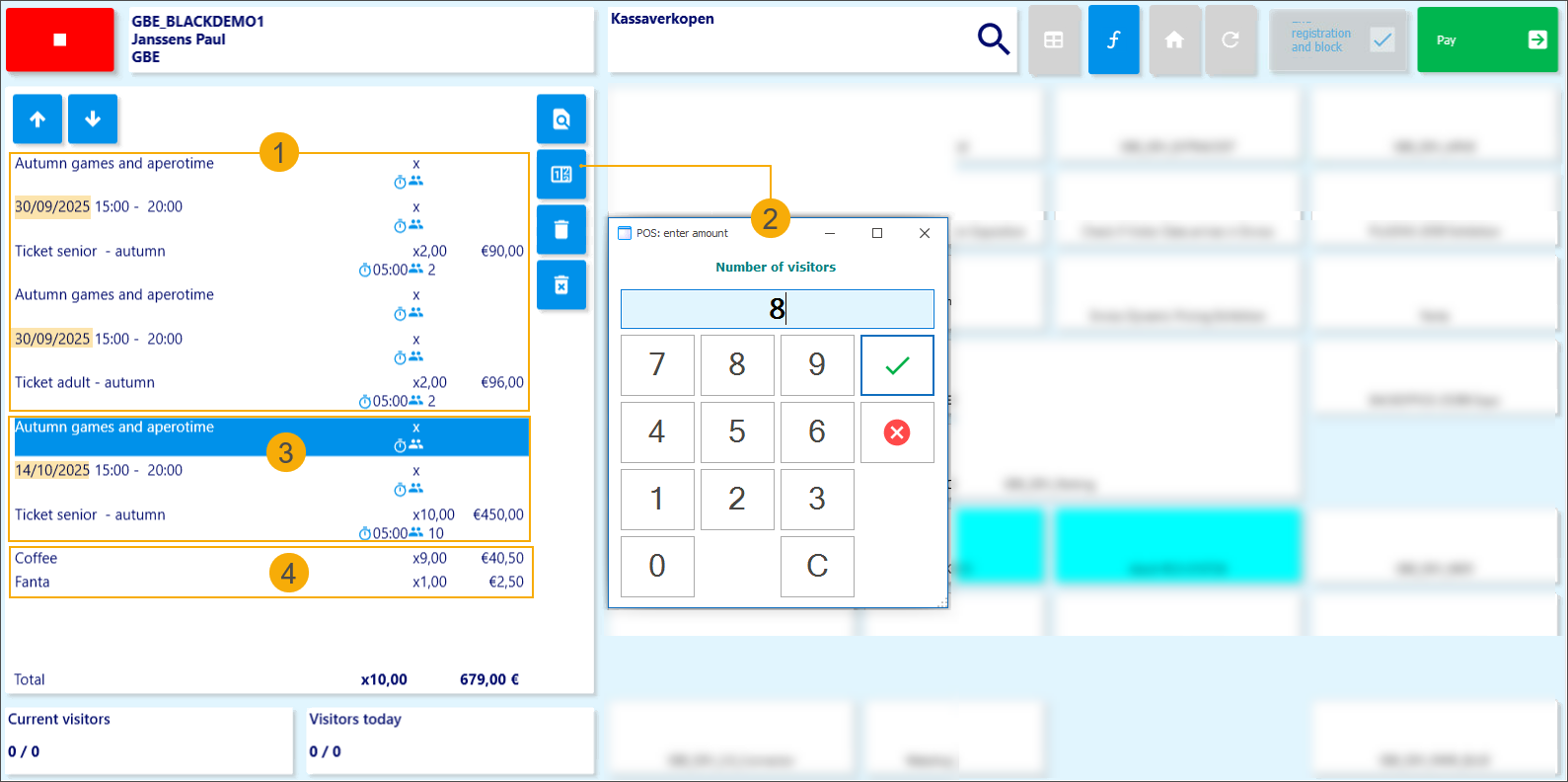
The cashier can adjust the ticket quantity. (2)
The system checks pricing and capacity to validate the change. If the adjustment is not possible, the quantity will automatically revert to its previous value.
The cashier can add multiple Enviso "pay later" ticket orders. (3)
The cashier can add Recreatex articles to the same basket with Enviso "pay later" ticket orders. (4)
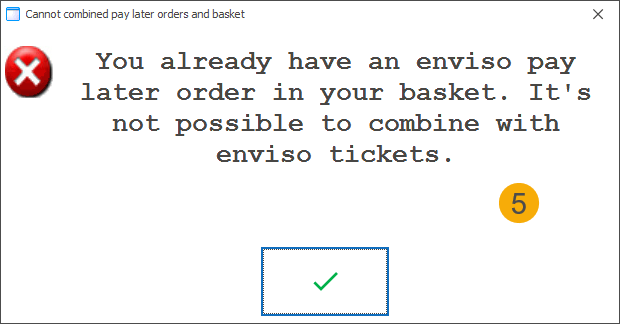
It is not possible to combine an Enviso "pay later" ticket order with the purchase of Enviso exhibition tickets at the POS in a single transaction. (5)
Invalid orders cannot be retrieved at the POS.
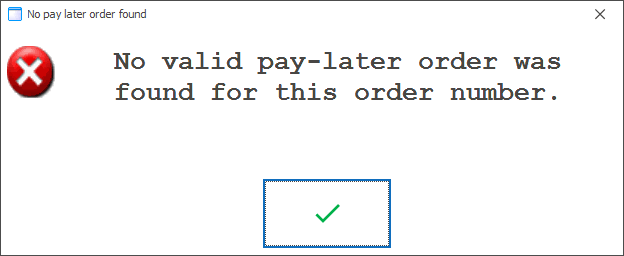
This includes orders with a past visit date, orders past the cut-off time, or orders with a status other than reserved.
The system displays an error message when an invalid order is entered.
To complete the transaction, the cashier follows the regular POS payment flow. Once the payment is successful, Recreatex automatically registers the sale (1) and confirms the order in Enviso (2).
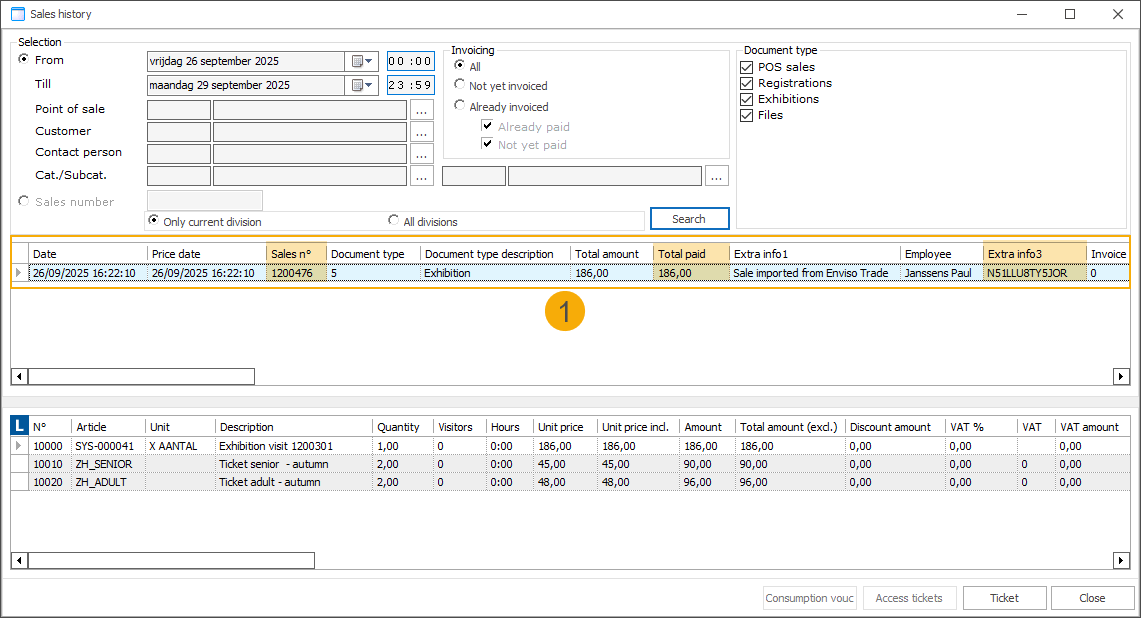
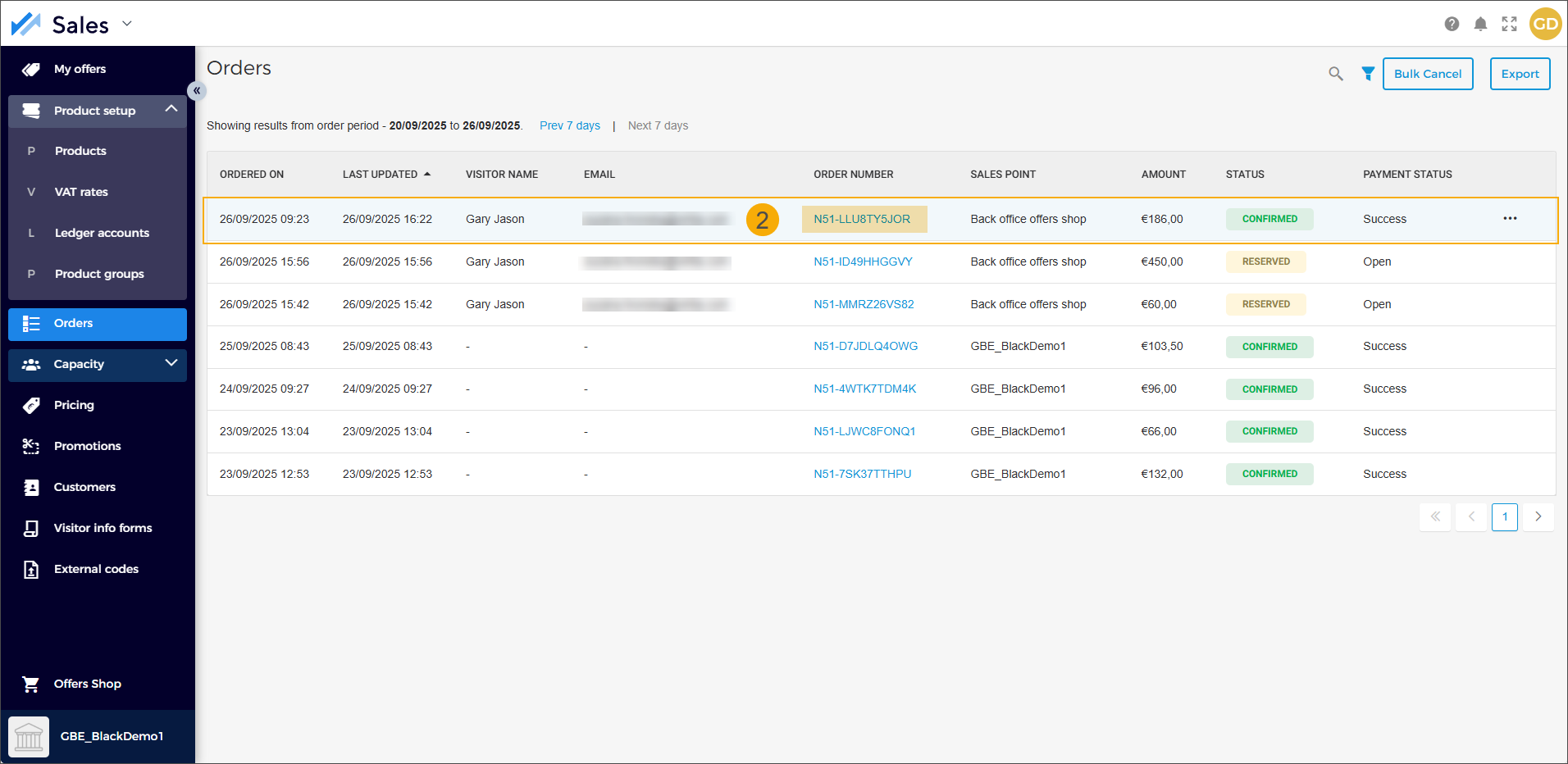
POS: Add tickets and memberships to existing customer cards
When purchasing exhibition tickets, memberships or registering for activities at the POS, the system generates card numbers automatically. With the new feature, cashiers can now scan or enter an existing customer card to replace the suggested number, allowing tickets to be added to a card the customer already has.
This flexibility allows customers to purchase multiple tickets, assigning them to existing customer cards where available, while letting the system automatically generate barcoded tickets for guests without a card.
This POS functionality supports the processing of tickets and memberships originating from the following modules:
General - tickets/memberships sold independently
Exhibitions - exhibition tickets
Activities - activity registrations using a registration article to generate an access ticket
Configuration
The membership article used must have the following configuration:
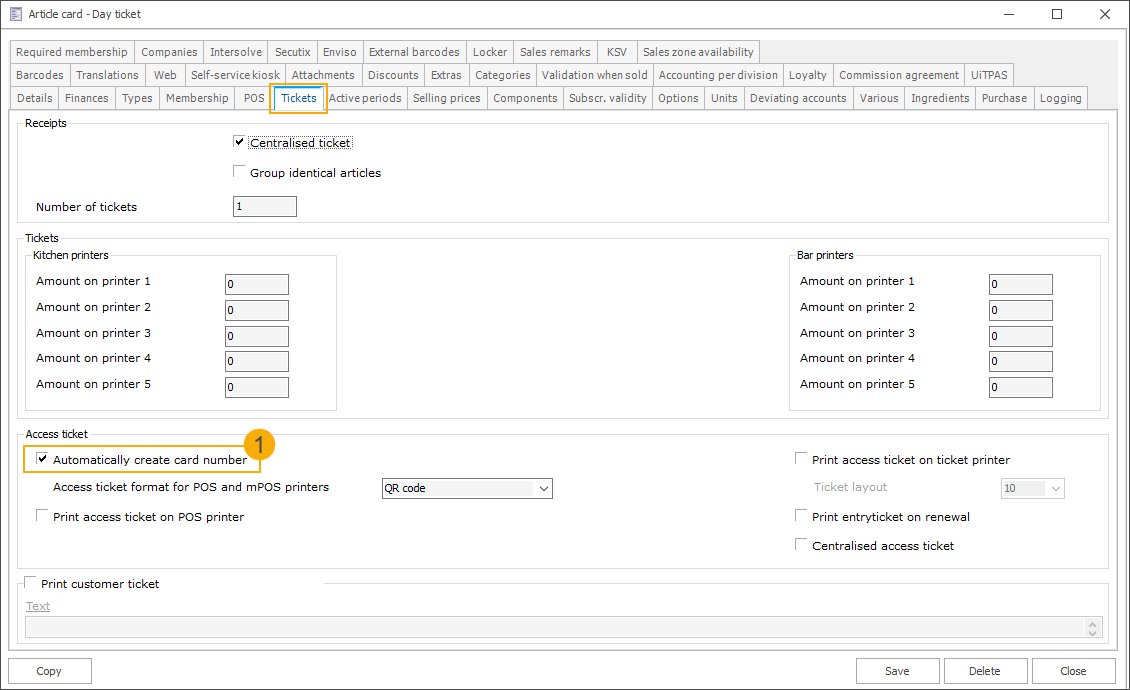
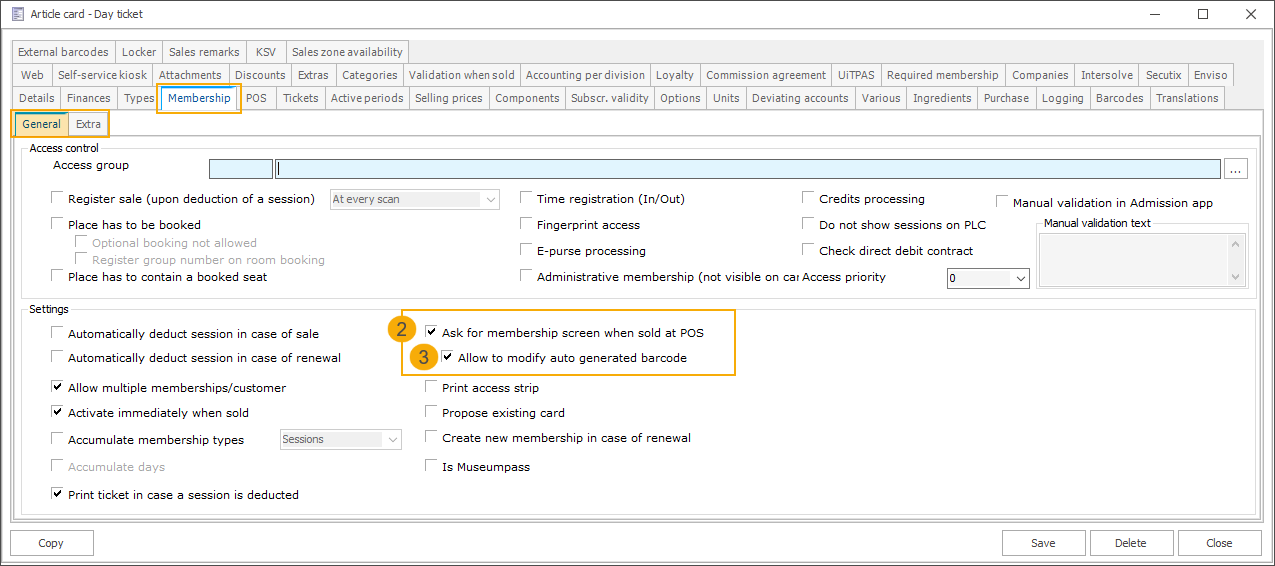
Activate the setting Automatically create card number (1) on the article card under the tab Tickets.
Then, go to the tab Membership > General where the option Ask for membership screen when sold at POS (2) is now available and can be activated.
Once this setting is enabled, the new sub-setting Allow to modify auto-generated barcode (3) can also be activated. With this option, the card number field at the POS becomes editable, allowing the cashier to replace the proposed card number with an existing customer card.
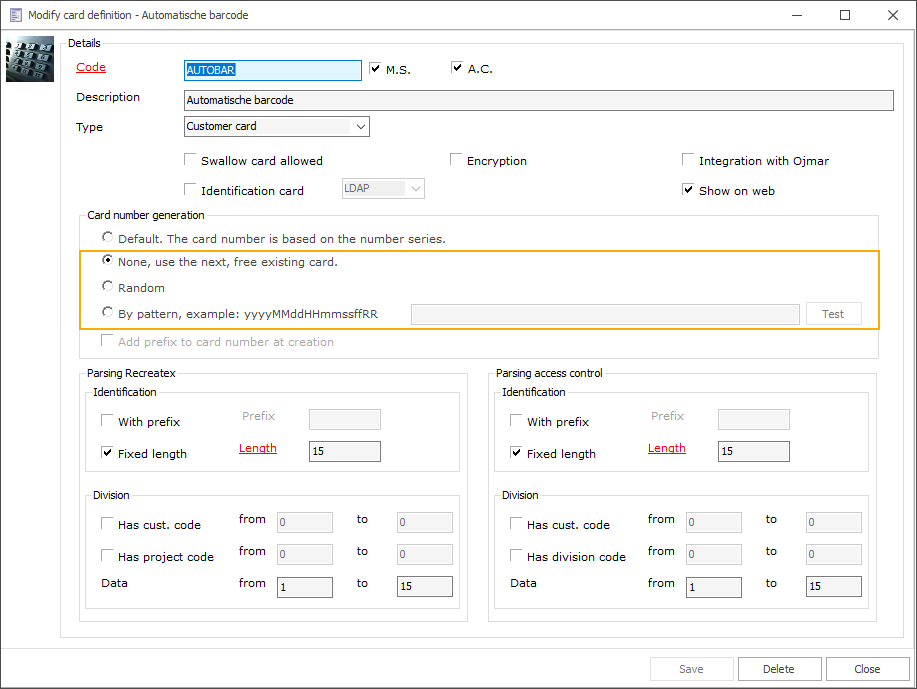
Further, ensure that the card definition (SydAdmin) used to auto-generate card numbers is set up using one of these options:
Wichtig
Manual modification of the card number is not supported for card definitions based on a number series, as number series cannot be reset. If a number series card definition is used, the card number field remains read-only, even if Allow to modify auto-generated barcode is enabled.
How it works
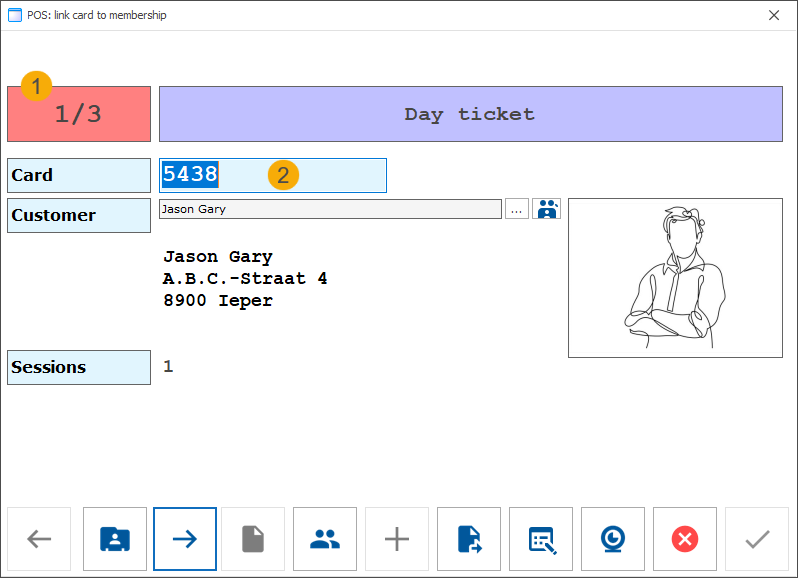
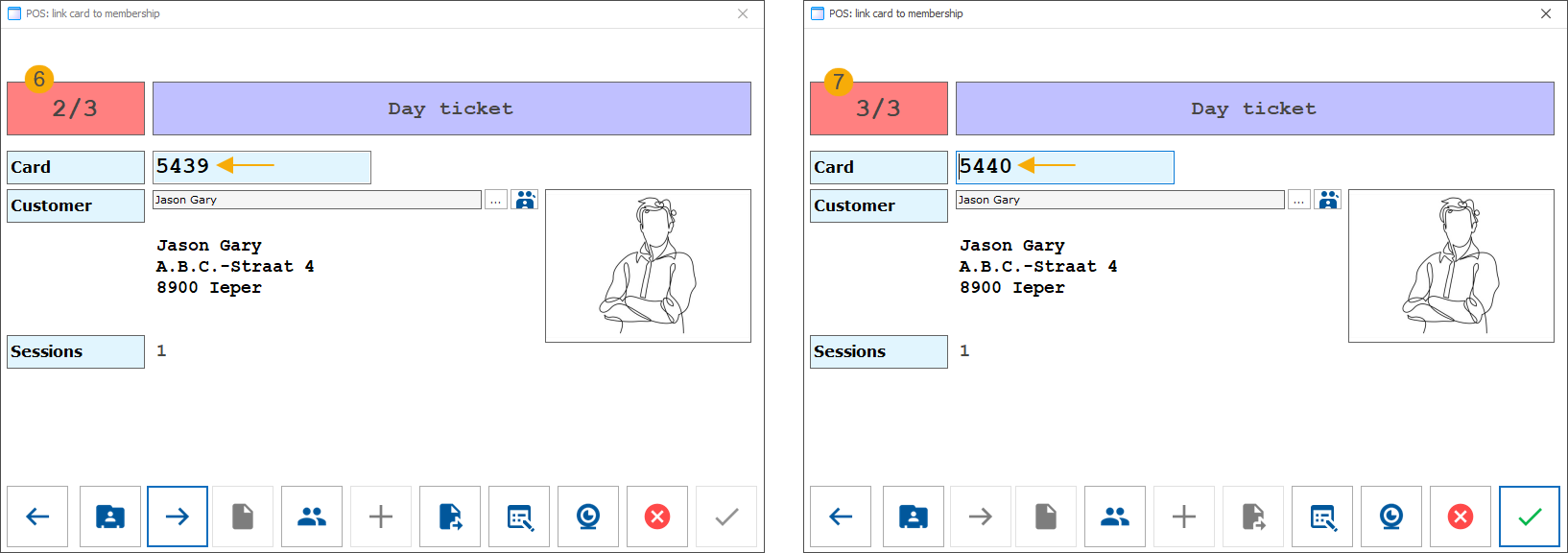
In this example, the customer has purchased three tickets. After pressing the Pay button to complete the transaction, the system generates three tickets, each with an automatically assigned card number, and opens the Link card to membership screen.
We now see the first ticket (1) displayed, along with a suggested card number (2). This number is editable.
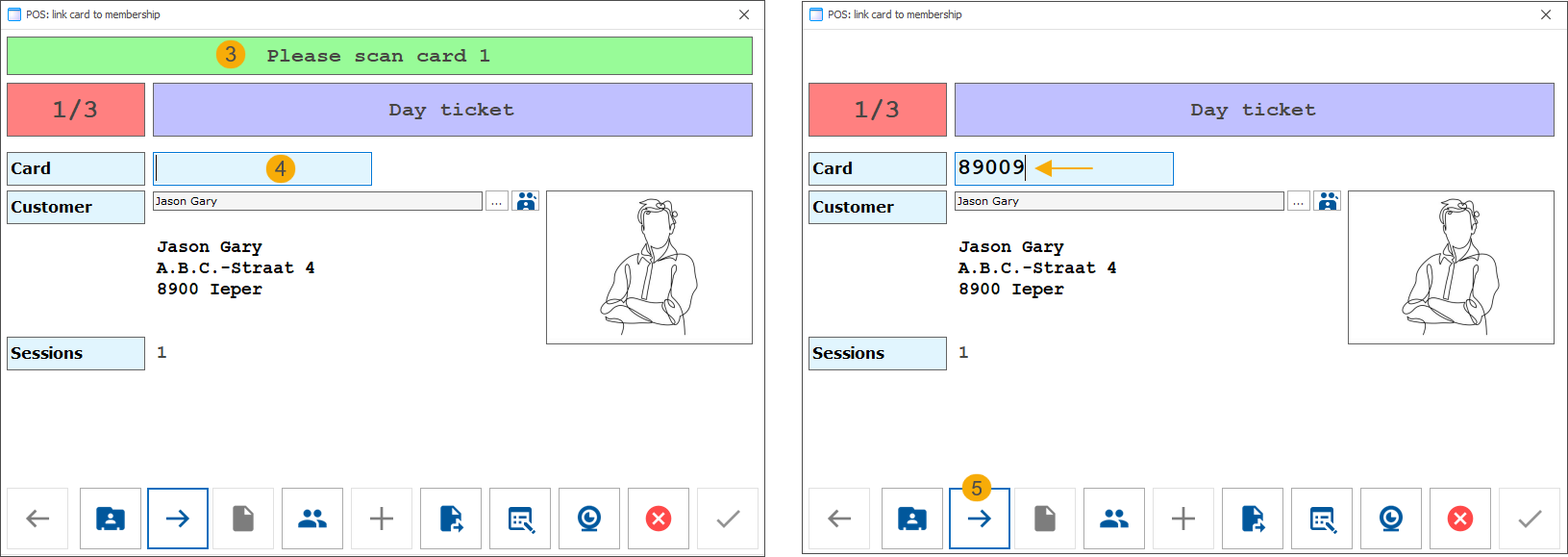
The customer requests to use their existing card (number 89009). The cashier either scans the card (3) or enters the card number manually (4). The system verifies whether the entered card number is linked to the currently selected customer.
The cashier then proceeds to the next ticket (5).
For the second and third tickets, the cashier accepts the auto-generated card numbers without changes.
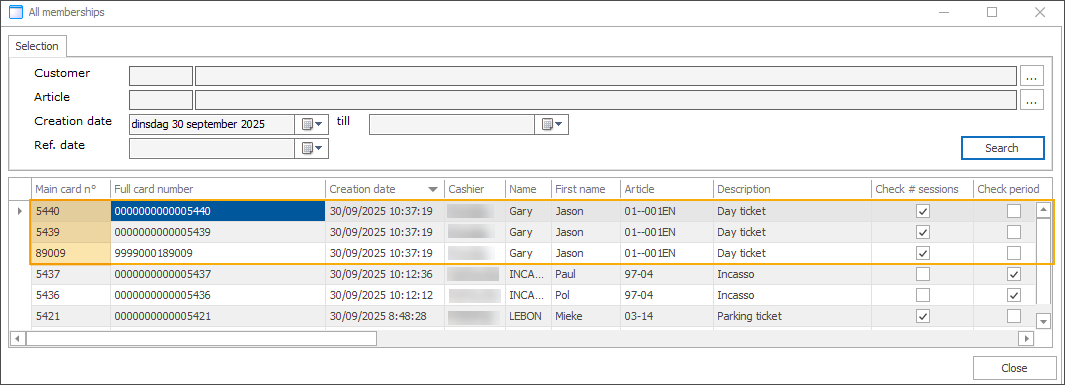
In Recreatex backoffice, we can now see one ticket linked to the customer’s existing card and two tickets assigned to auto-generated card numbers.
Anmerkung
If an auto-generated card number is not used because the ticket or membership is linked to an existing customer card instead, it will be reused during a future sale when a new card number is required.
This helps prevent gaps in card numbering and reduces the number of unused cards in the system.
Use exhibition counters to track activity registrations
To improve coordination and visitor management across modules, we have extended the counter functionality to include the Activities module. This means counters previously used for exhibitions can now also incorporate activities, allowing both to be tracked within the same counter.
This enhancement enables organisers to monitor attendance across exhibitions and activities held in the same location and time slot using a shared counter system. It supports accurate capacity tracking and helps prevent overbooking.
The exhibition counter logic remains unchanged. The Activities module now includes a full implementation of counter-based validation, including capacity checks and registration logic.
Configuration
In Timeslot ticketing > Settings > Counters, open the exhibition counter you want to use for an activity. In addition to the Exhibitions tab, there is now a new Activities tab that lists all currently available activities.
Select an activity to link to this counter. All counter functionalities available for exhibitions can now also be applied to activities in the same way.
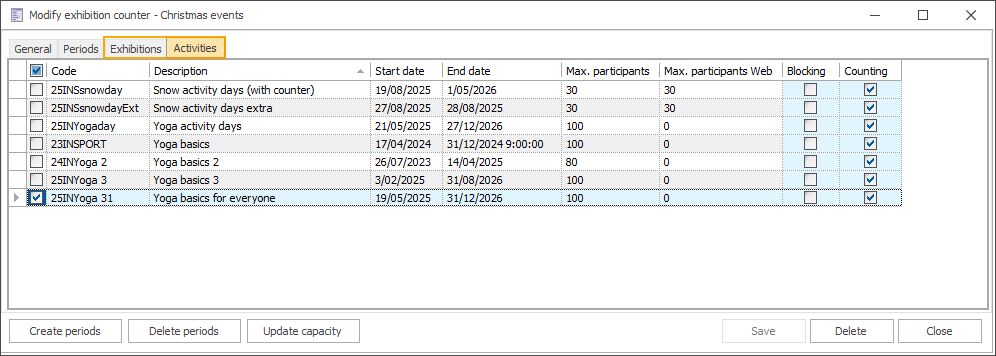
In the Activities module, open the relevant activity. You will now see an additional Counter tab, where you can activate or deactivate counters for that specific activity.
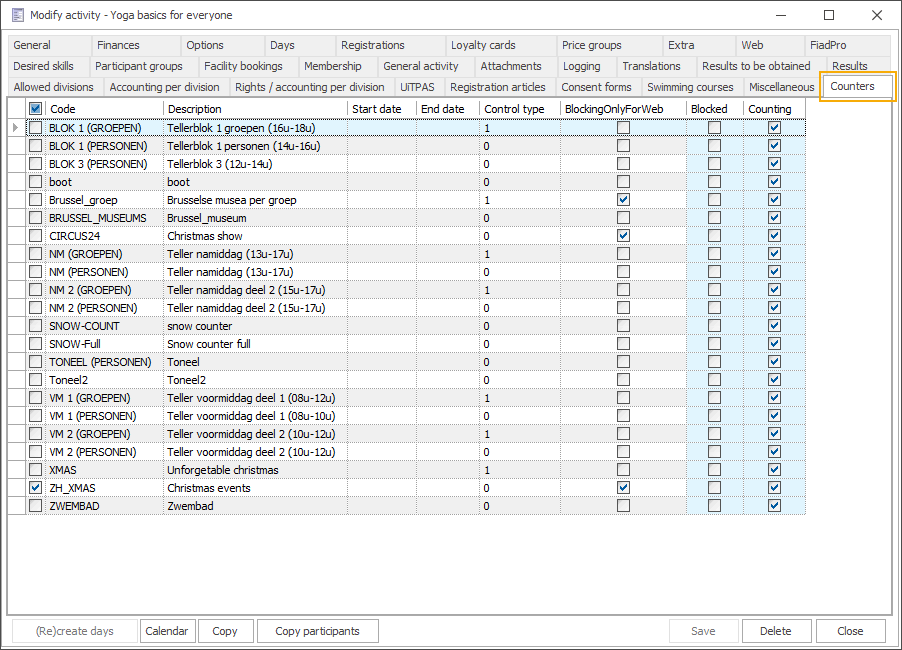
For a detailed explanation of counters, see Counters.
Registering at the activity level
The counter is considered full when any of the periods associated with the activity reaches its maximum capacity. Counter checks are applied at the activity level, not on individual days.
Anmerkung
The counter takes into account activity registrations with the status Booked temporarily and Booked.
Registrations with the status Cancelled or On waiting list are not included in the calculation.
Selecting an activity with any of the available periods full triggers a message asking whether the customer would like to join the waiting list.
Changing the number of participants in the basket triggers a check of the overall counter capacity.
If the counters are full, a blocking message appears, and the number of visitors is reverted to the previous value.
When counters are full, the following actions trigger a message informing the customer that the registration will be placed on the waiting list:
Changing the total number of participants
Adding family members
Changing the status to Booked
Selecting or changing an activity
The following actions trigger a message that reverts the value to the previous one:
Changing the number of participants when modifying the participant's registration
A check is performed immediately after changing the number, once you navigate away from the field (before Save button is activated).
A check is also performed when clicking Save (e.g. if the button was already active due to other changes).
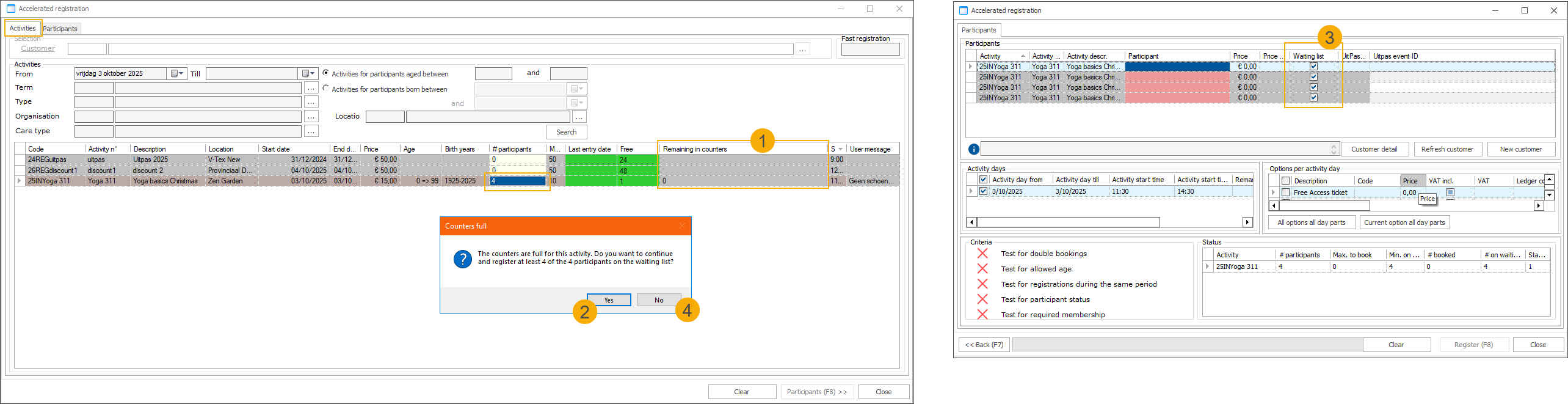
A new column Remaining in counters (1) has been added to the table under Activities
When changing #Participants beyond capacity, a message appears asking whether any participants should be placed on the waiting list.
Clicking Yes (2) places participants exceeding the capacity on the waiting list (3)
Clicking No (4) reverts the number to its previous value.
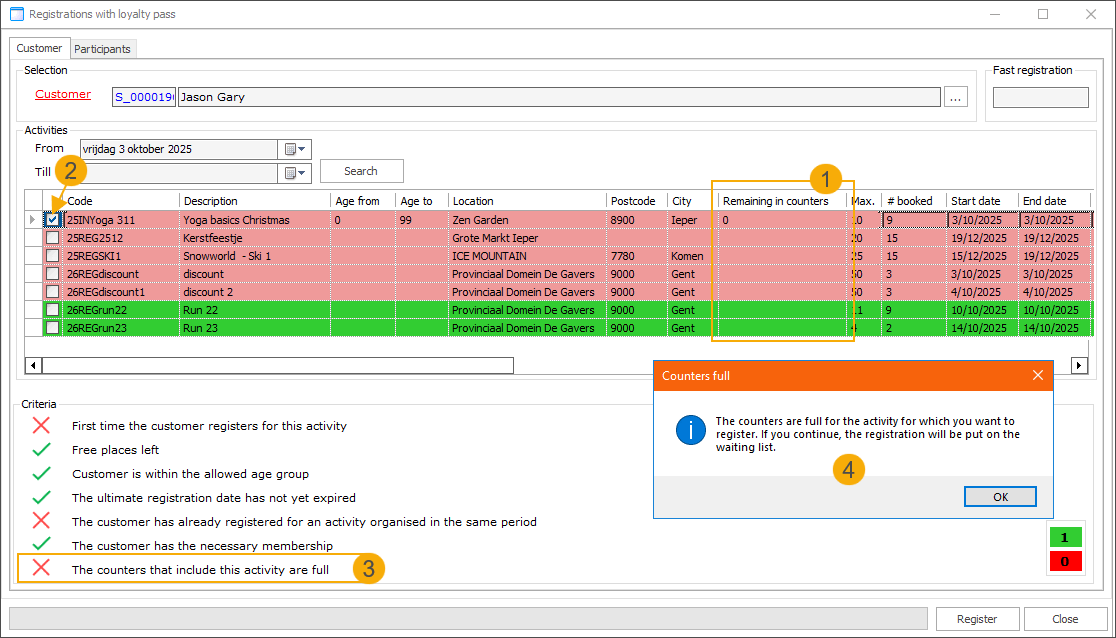
A new column Remaining in counters (1) has been added to the table under Activities
Selecting an activity (2) triggers the counter validation.
New validation criterion: Counters that include this activity are full (3).
If counters are full, a message appears informing that continuing will place the registration on the waiting list (4).
Registering at the activity day level
Counter checks apply to specific activity days or day parts.
Anmerkung
The counter takes into account activity registrations with the status Booked temporarily and Booked.
Registrations with the status Cancelled or On waiting list are not included in the calculation.
The remaining number of participants on the activity day selection screen is based on counters, not actual activity capacity.
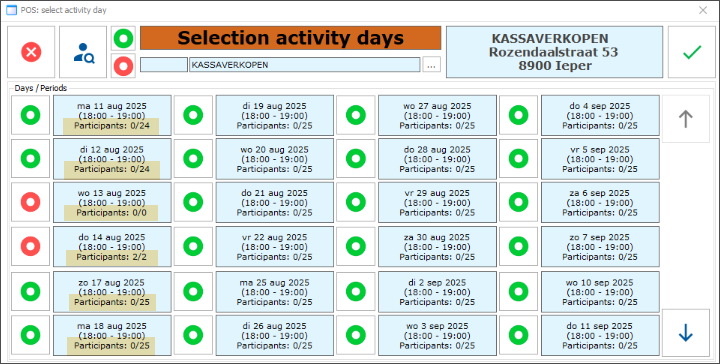
Selecting a full activity day (i.e. when the counter is full) triggers a message asking whether the customer would like to join the waiting list.
If the counter is full, changing the number of participants for an activity day already in the basket triggers an error, and the number cannot be modified.
When counters are full for any of the selected activity days, the following actions trigger a message informing the customer that the registration will be placed on the waiting list:
Changing the total number of participants
Selecting or changing an activity
Changing the registration status to Booked triggers a counter check for all selected activity days. If capacity is insufficient, the status is reverted to On waiting list.
When adding an activity day to a registration:
If the status is On waiting list, no check on counter capacity is performed.
For all other statuses, each selected day is checked. If the counter is full, an error is displayed, and registration for that day is not allowed.
Modifying the Number field value in participant registration is not supported for registrations at the activity day level.
Counter capacity checks are not performed when changing the value.
Counter capacity checks are also not performed upon saving.
Registration is blocked when counters are full:
Changing an activity triggers an error if all activity days are full, and no registration is possible for this activity.
Selecting an activity day part triggers an error, and registration is not allowed for that day part.
Selecting an activity day and clicking Search triggers a counter check. If the day part is full, an error is displayed and registration is not allowed.
Clicking Execute triggers a counter check. If the selected day part is full, an error is displayed and registration is not allowed.
Webshop: Use exhibition counters to track activity registrations
The exhibition counters feature has been extended to include activity registrations made via the Recreatex webshop. This means that registrations submitted through the webshop’s Activities module are now taken into account when calculating counter limits.
Counters can be configured for:
activities only
combination of exhibitions and activities
This enables flexible capacity management across various types of offerings, whether you are selling activity registrations alone or combining them with exhibition tickets.
Configuration
Counters are configured in the Recreatex backoffice. For a comprehensive overview of how counters function and how to set them up, refer to Counters.
Details on how to include activities in exhibition counters can be found in the previous topic.
No configuration is required on the webshop side.
Registering at the activity level
If any linked activity day is a part of a full counter, the entire activity is considered fully booked.
The number of available places for an activity is the lowest of the following values:
The maximum number of participants set for the activity
The remaining places on the linked counter(s)
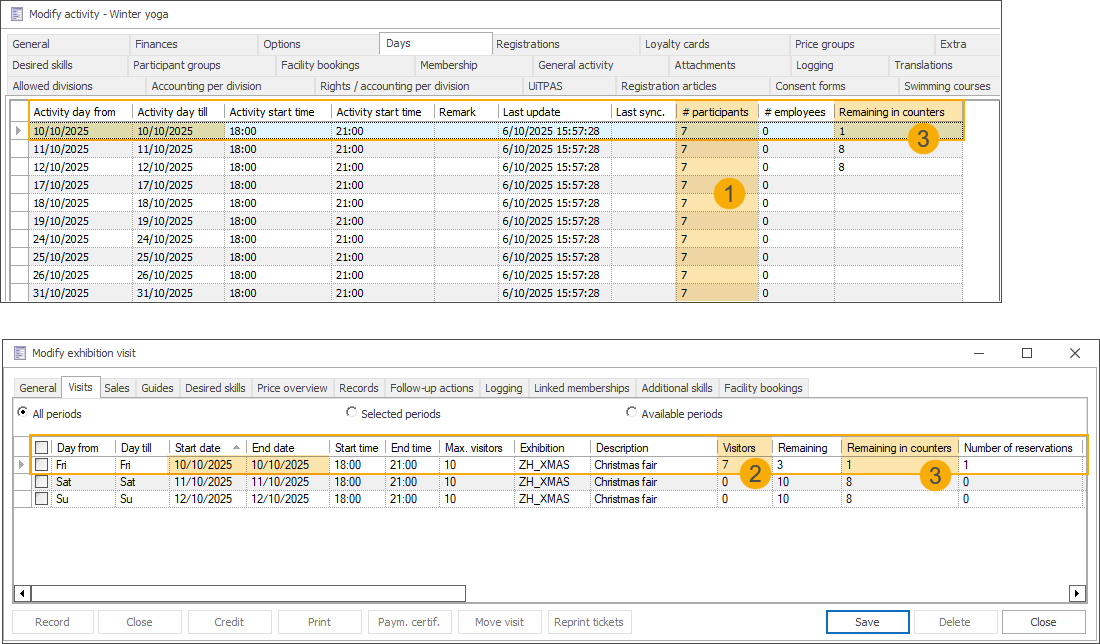
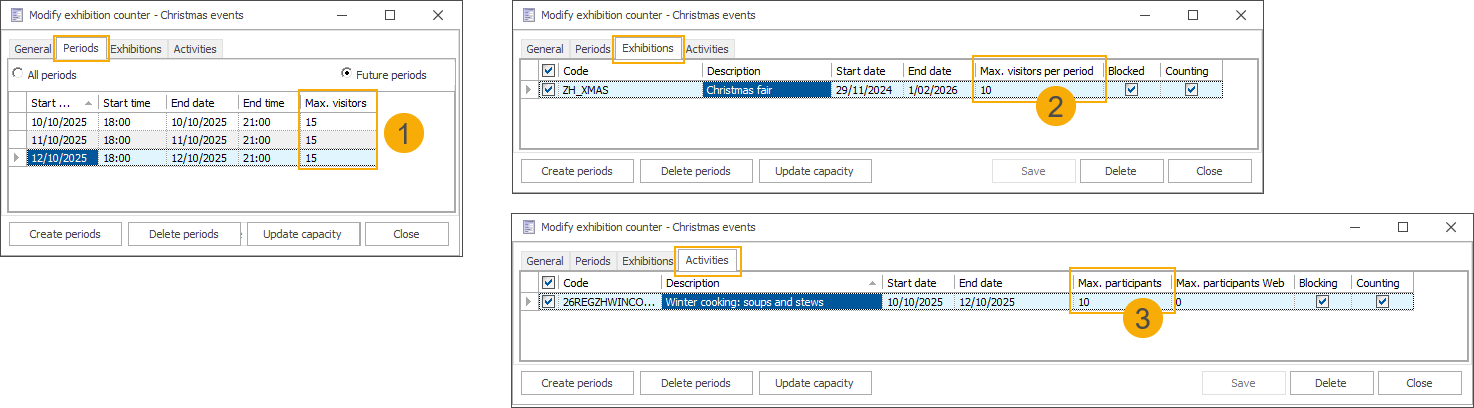
In this example, a counter (1) named Christmas events is configured with a total capacity of 15 visitors on the dates 10, 11, and 12 October from 18:00 to 21:00. An exhibition (2) and an activity (3), each with a maximum capacity of 10 participants, are linked to this counter and scheduled on the same dates and times.
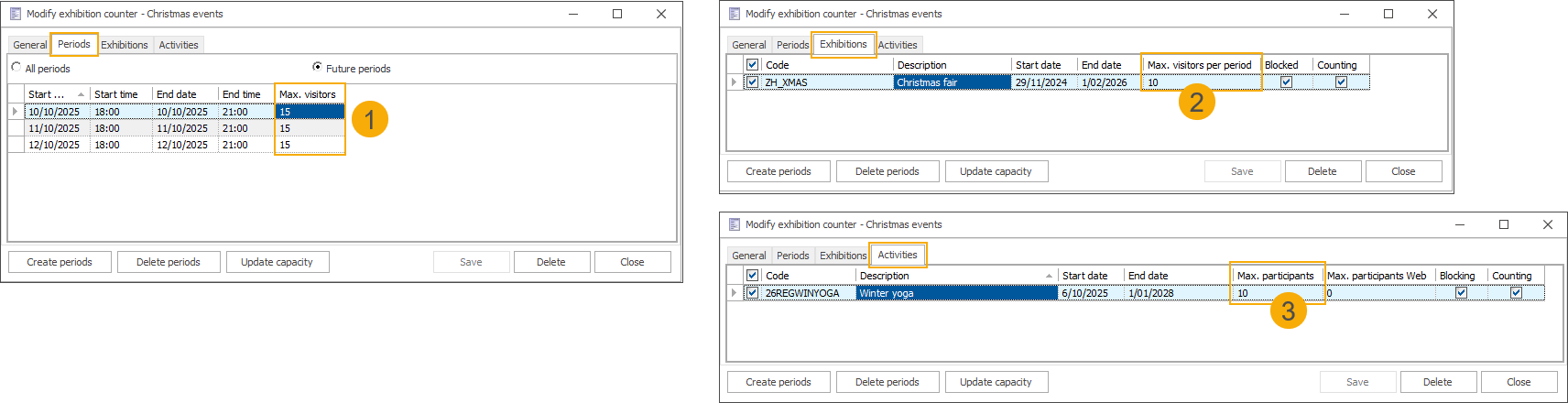
On 10 October, there are 7 participants registered for the activity (1) and 7 visitors registered for the exhibition period (2), both linked to the same counter. Since the Christmas events counter allows a total of 15 visitors, the Remaining in counters value (3) shown in the backoffice is 1, indicating that only one more registration can be accepted across both offerings for that date.
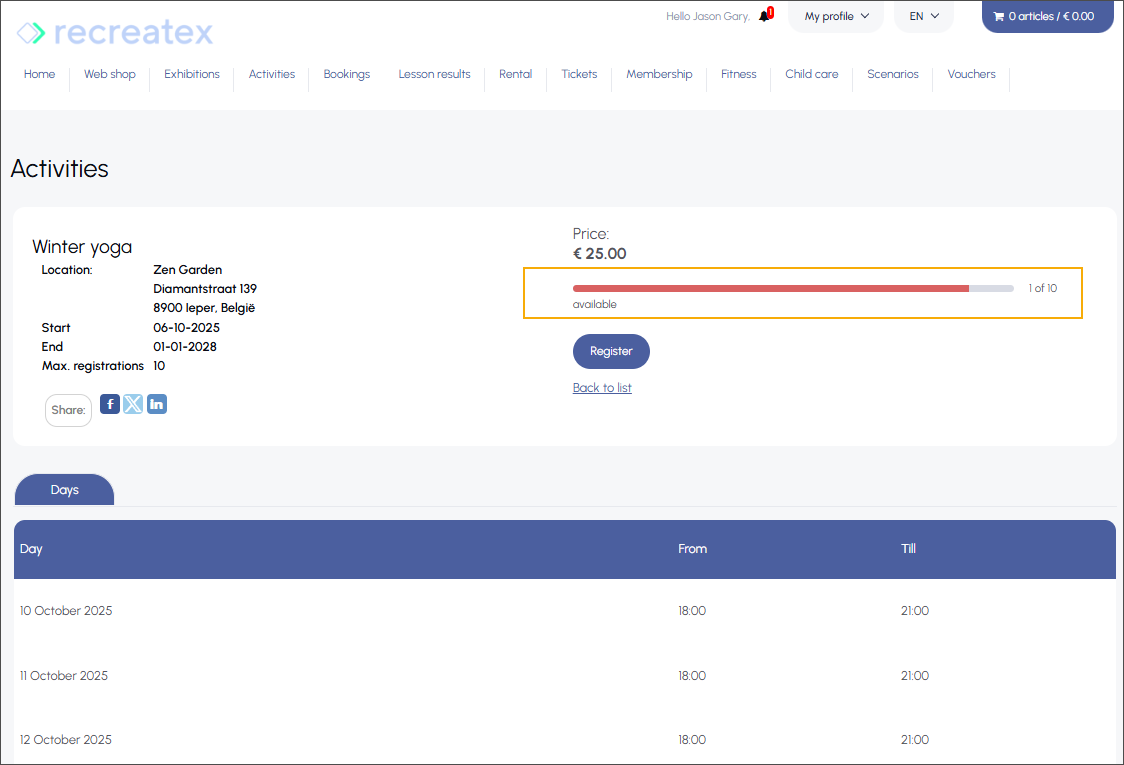
When a customer registers for an activity via the webshop, they will see that only one spot remains available for that activity, based on the current counter status.
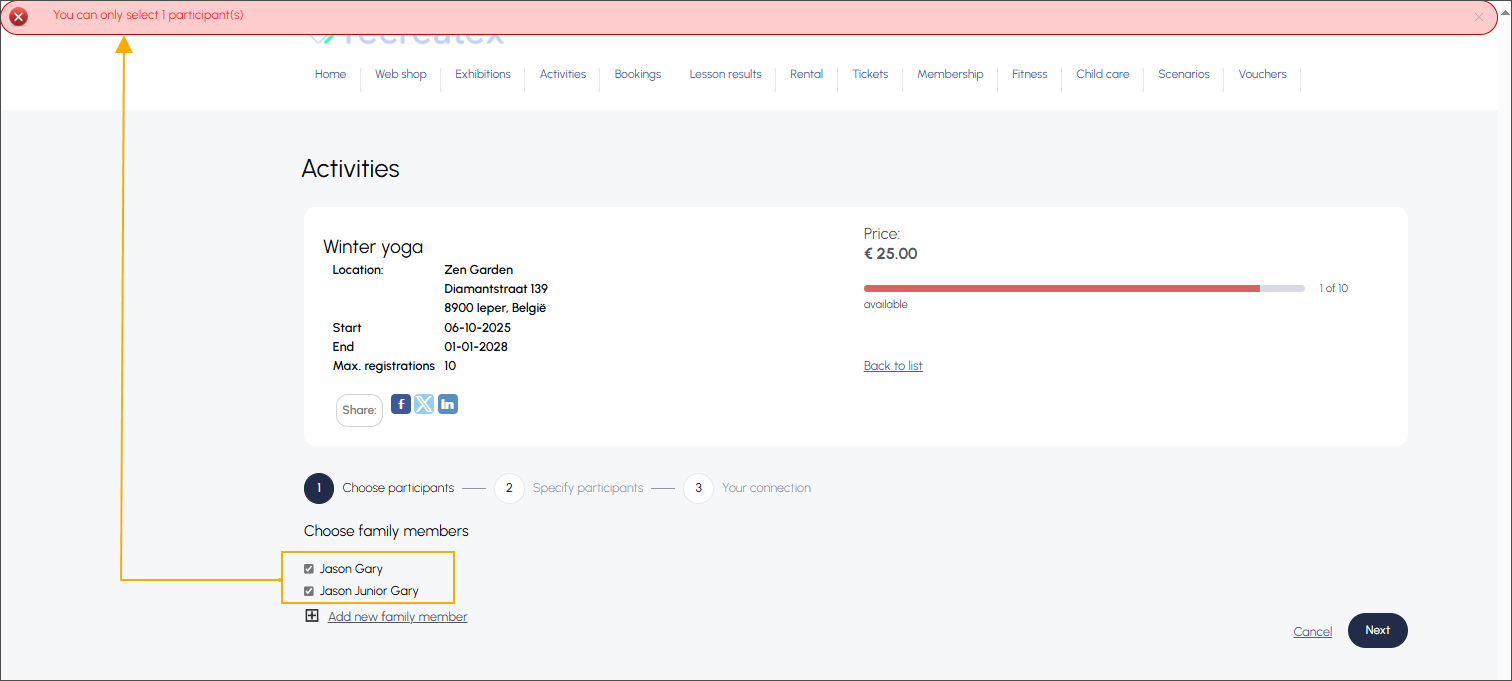
Registering more participants than allowed by the counter results in a blocking error.
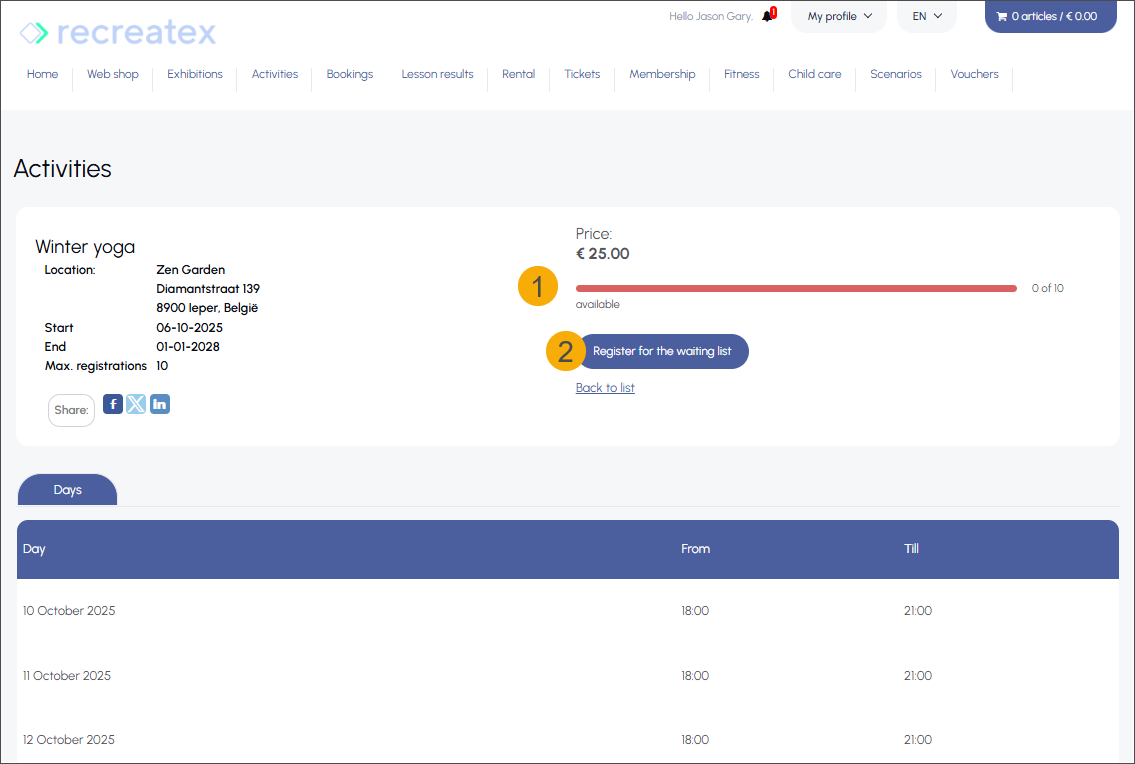
Once the last available participant is registered, the counter is updated (1), and only waiting list registration (2) remains possible.
In the backoffice, the counter capacity is now 0 (1), with 8 participants registered for the activity (2) and 7 visitors booked for the exhibition period (3).
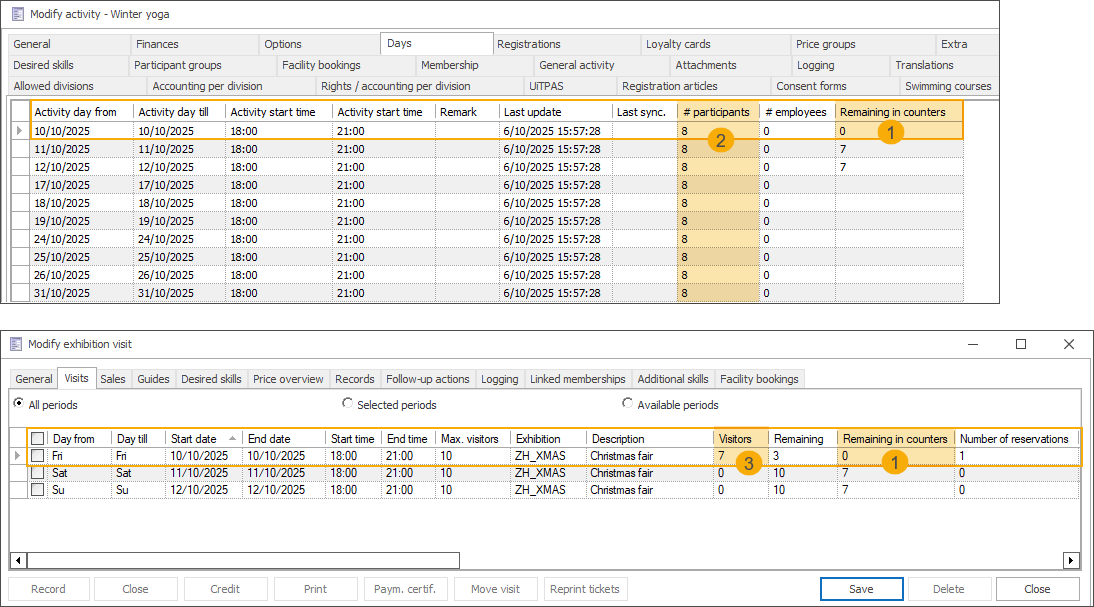
Although each event had a capacity of 10 participants/visitors, the shared counter ensured that the combined registrations across both the activity and the exhibition did not exceed the total limit of 15 visitors.
Registering at the activity day level
If an individual activity day or day part is part of a full counter, only that day or day part is considered fully booked.
The number of available places for an activity day or day part is the lowest of the following values:
The maximum number of participants set on the activity level
The remaining places on the linked counter(s) for that specific day/time
In this example, a counter (1) named Christmas events is configured with a total capacity of 15 visitors on the dates 10, 11, and 12 October from 18:00 to 21:00. An exhibition (2) and an activity (3), each with a maximum capacity of 10 participants, are linked to this counter and scheduled on the same dates and times.
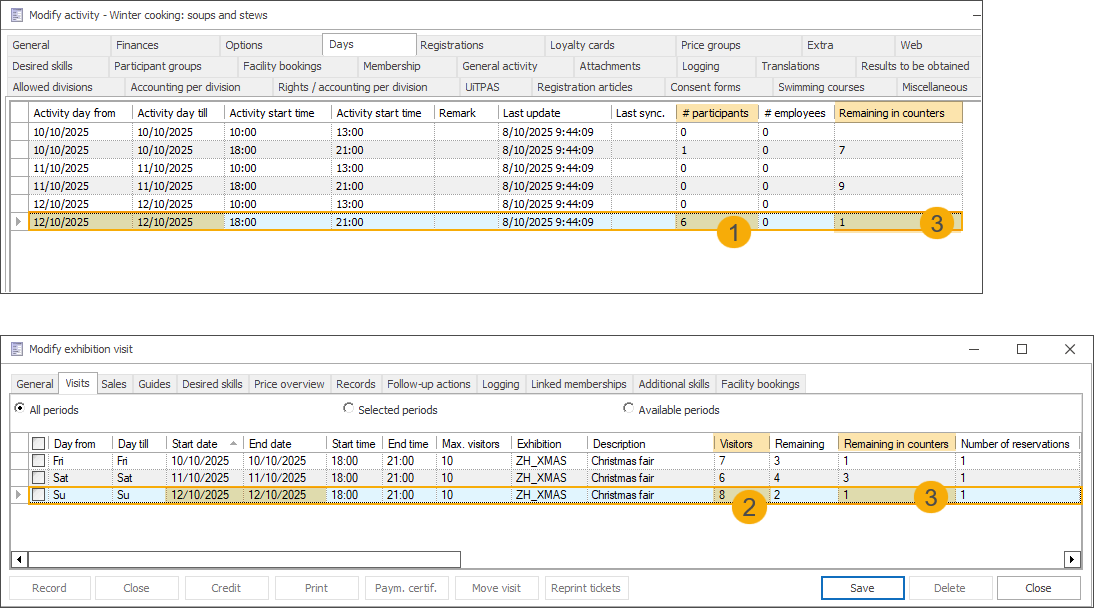
On 12 October, there are 6 participants registered for the activity day part (1) and 8 visitors registered for the exhibition period (2), both linked to the same counter. Since the Christmas events counter allows a total of 15 visitors, the Remaining in counters value (3) shown in the backoffice is 1, indicating that only one more registration can be accepted across both offerings for that date and time.
When a customer registers for an activity via the webshop, they will see that only one spot remains available for that activity day part, based on the current counter status.
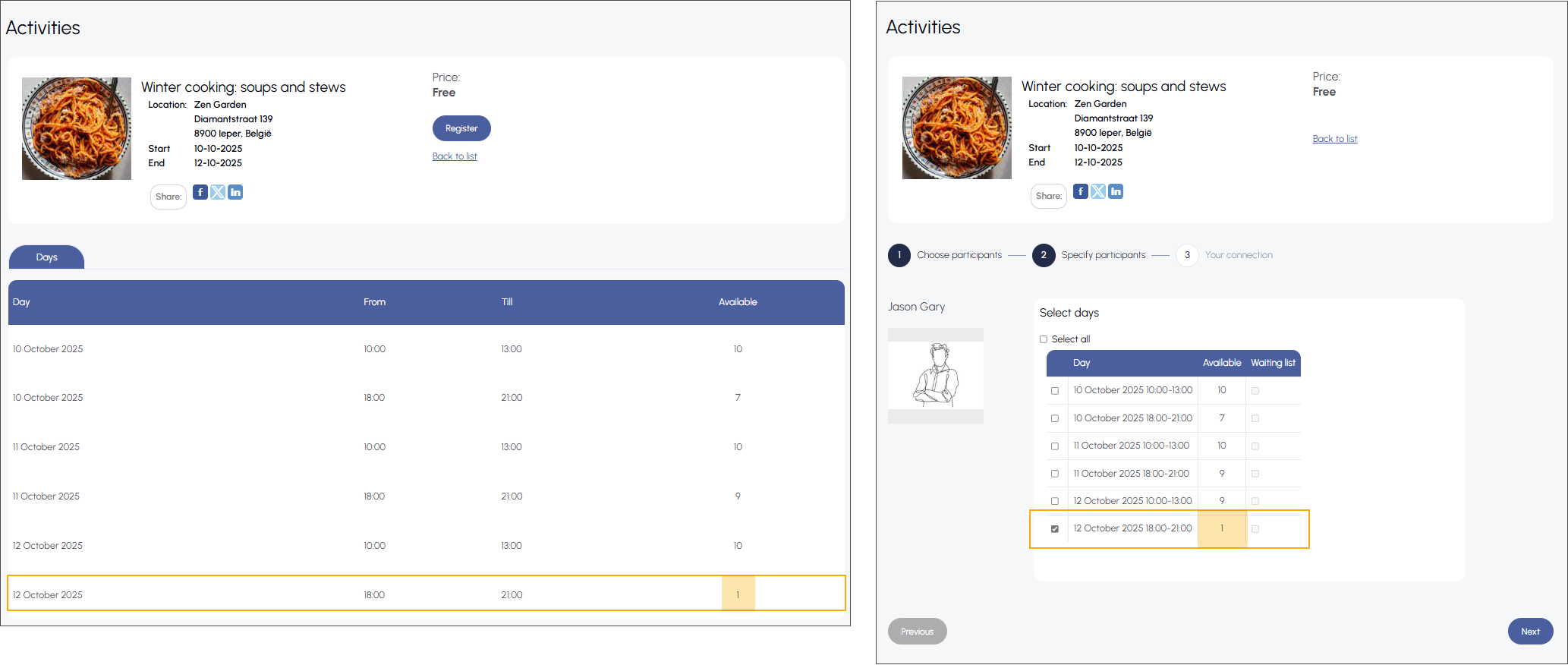
Once the last available participant is registered, the counter updates to show the label Full (1). Selecting that day part is no longer possible (2), and only registration for the waiting list is allowed (3).
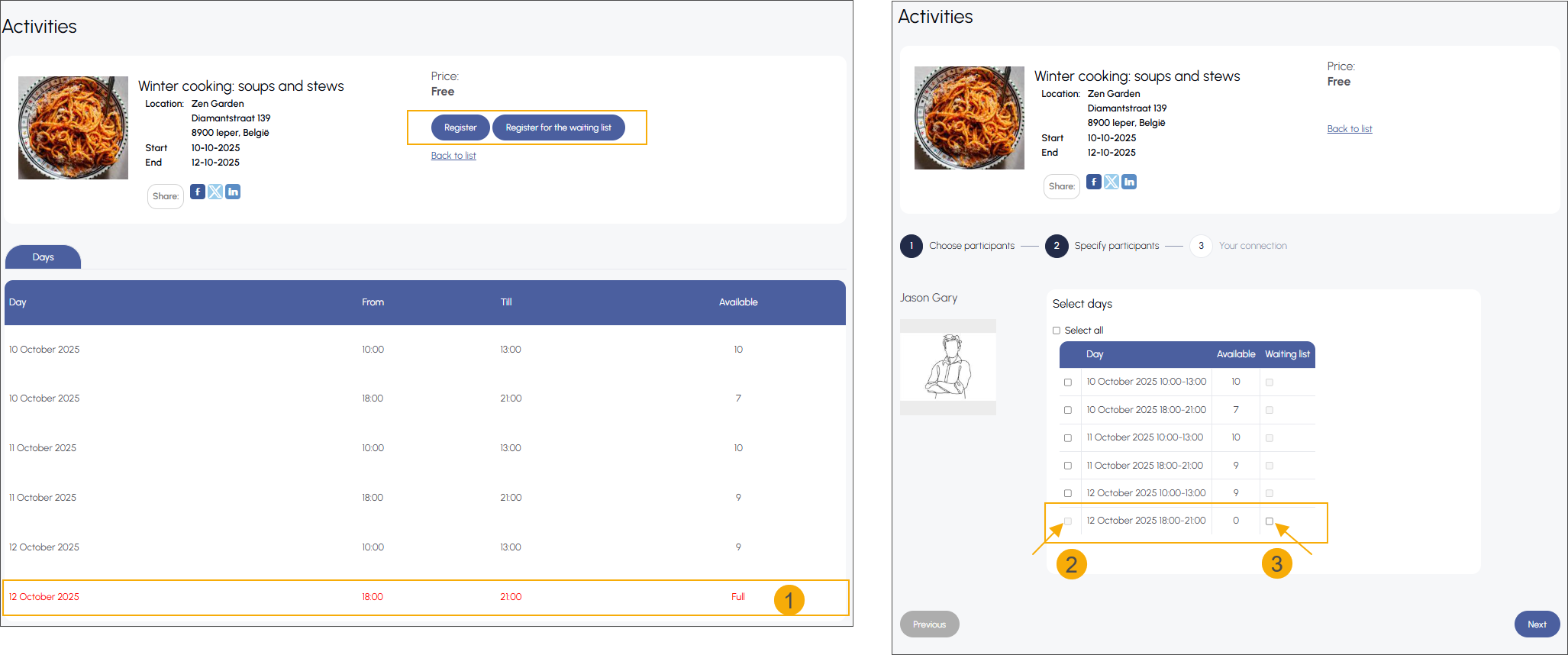
In the backoffice, the counter capacity is now 0 (1), with 7 participants registered for the activity day part (2) and 8 visitors booked for the exhibition period (3).
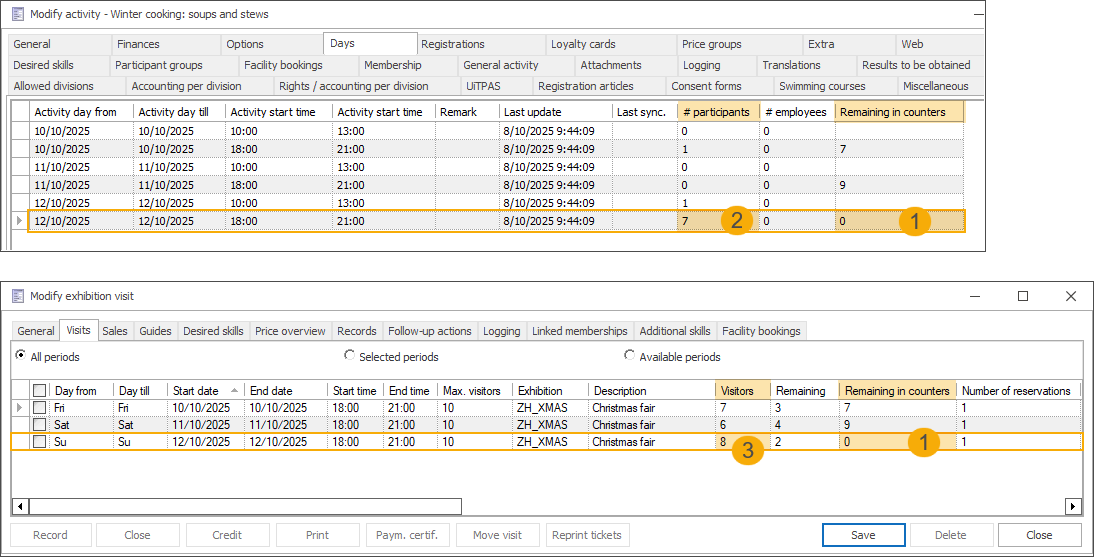
Although each event had a capacity of 10 participants for 12 October from 18:00 to 21:00, the shared counter ensured that combined registrations across both the activity day part and the exhibition period did not exceed the total limit of 15 visitors.
API change log
Date | Type | Method | Summary | Internal reference |
|---|---|---|---|---|
10 Jun 2025 | Edit |
|
| BACKOFFICE-26402 |
19 Jun 2025 | Edit |
|
| BACKOFFICE-26506 |
09 Jul 2025 | Edit |
| SaveEntryNotaCriteria
SaveEntryNotaResult
| BACKOFFICE-23460 |
10 Jul 2025 | Edit |
| ExpositionSearchCriteria
FindExpositionsResult
| BACKOFFICE-26571 |
15 Jul 2025 | Add |
| Retrieves additional suggestions for a given SalesZone | BACKOFFICE-26244 |
08 Sep 2025 | Add |
| Deletes journal lines by id. | BACKOFFICE-25696 |
16 Sep 2025 | Add |
| Add TicketTicketDescription | BACKOFFICE-26768 |
18 Sep 2025 | Edit |
| Add SortOrder to the responses of each of these endpoints | BACKOFFICE-26974 |