General settings
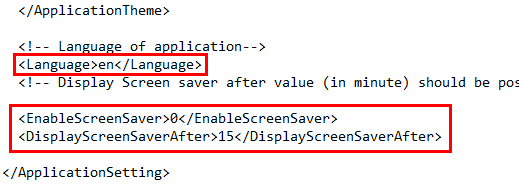
It is possible to configure general settings by editing the language and screen-saver parameters in the Settings XML file with appropriate values.
Alternatively, the parameters can be configured by using the Infoplay configuration tool.
 |
Language | This parameter allows to define the language of the Infoplay desktop application. XML file: Use a value from the following options
Configuration tool: Select the desired language from the drop-down list.
WarningWhen using Windows CE, it is important that the option selected for the parameter Language is the same as the installed language package. If this is not the case, the application will stop working properly. Refer Windows CE. | |
Enable screen saver | This parameter allows to enable screen saver when the Infoplay desktop app is idle for a certain amount of time. XML file: Use a value from the following options 1 = Enables screen saver 0 = Disables screen saver Configuration tool: Activate the parameter Display screen saver to enable screen saver for the Infoplay app. | |
Screen saver timing | This setting is useful when the parameter Enable Screen saver (visualised as Display screen saver on the configuration tool) is activated. In this case, it is possible to define how much idle time (in minutes) must elapse before the the screen-saver is displayed. The default is 15 minutes. In this case, if the Infoplay desktop app is idle for 15 minutes, the screen-saver will be displayed until any activity takes place on the app. The screen-saver time can only be defined in minutes and should be more than 1 minute. WarningIf the Infoplay application goes out of order, an Out of order message will be displayed. In this case, the screen-saver will not be displayed irrespective of the amount of time elapsed. |
