Apr 16, 2025
Sales
Link ledger account with product
Venue users can now optionally link ledger accounts to products. Ledger accounts can be added or removed from products at any time as needed.
Linking ledger accounts requires the 'Manage product metadata' permission in the Enviso Admin app.
 |
Note
The feature to use Ledger accounts is available only to specific venues . You can request Vintia support to enable this feature for your venue.
Configure pay later cut-off time and reminder email
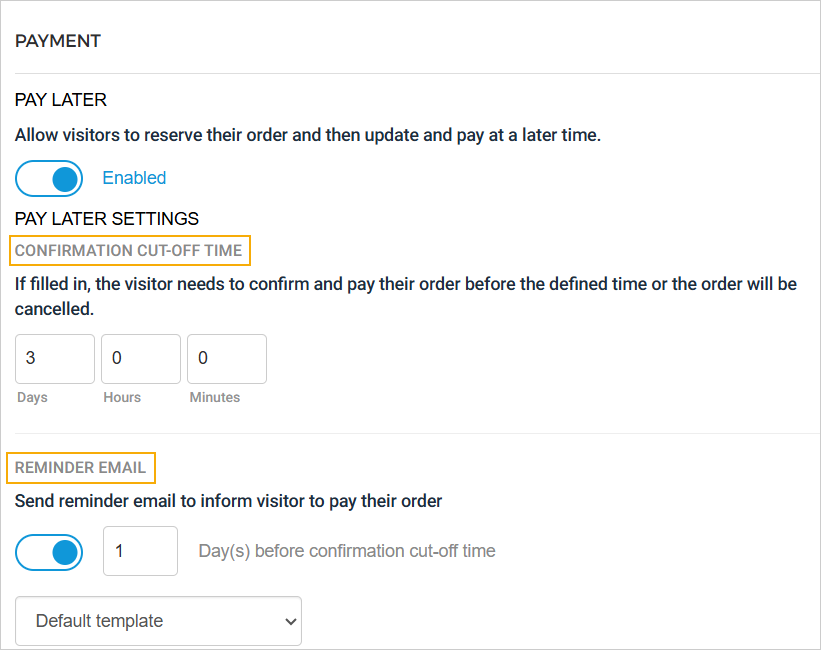 |
Confirmation cut-off time
When enabling the 'Pay Later' option for an offer, you can also define a confirmation cut-off time—the deadline by which the visitor must complete the payment. If the payment is not completed within this timeframe, the order will be automatically cancelled.
Example: If the cut-off time is set to 3 days, the visitor must complete the payment within 3 days of placing the order via the Ticketing widget. If not, the order will be cancelled automatically.
Reminder email
Enabling the 'Reminder Email' option allows you to specify how many days before the confirmation cut-off time a reminder email should be sent to the visitor, prompting them to complete the payment.
You can also choose the email template that will be used for the reminder. The Payment Expiry Reminder email template can be configured in Enviso Admin.
Note
Pay later cut-off time does not apply to Total offers with unlimited offer period and membership offers with fixed period validity.
Enhancement
Full order cancellation is possible only for reserved orders. The 'Cancel order' option is not available for orders with a confirmed status.
Admin
Webhook categories

A new Category column has been added to the Webhooks page.
Webhooks created via the Console app are categorised as System webhooks.
Webhooks created via the Admin app are categorised as Custom webhooks.
You can also view the notification logs for both types of webhooks.
Enhancements
A new field, 'Order number QR field' is available for the email and product template. This field will display the order number as a QR code.
A new email template, Payment expiry reminder, has been added to the Email templates page. It allows you to configure an email that will be triggered based on the payment confirmation cut-off time defined on the offer level, reminding the visitor to complete their payment before the deadline.
A new field 'Expiry Date' has been added to the Reserved Order email template. If included in the template, the visitor will receive a payment link expiry time based on the configured Pay later cut-off time.
Ticketing widget
Pay Later enhancements
The Pay Later option is hidden for offers where the cut-off time has already passed.
Logged-in visitors can complete payment for their reserved orders.
All visitors (logged-in or guest) can update a reserved order using the Pay Later option.
Visitors can only change the ticket quantity. Adding new products to the order is not allowed.
Trade for Resellers
Consult and update membership offers
In the Offers Shop of your Trade for Reseller account, you can now view and update membership offers.

Direct selling API
Added a new endpoint Patched reserved order. This endpoint updates an order by adjusting its capacity and recalculating the prices.
Reselling API
Added new field
frequencyTypein the response body for Search offers and Fetch offer information endpoints.