Initial requirements
Recreatex desktop application must be installed and configured with POS in the Sales zones.
Internet connection is required for all the functionalities of the application.
You require a Configuration QR code to connect the ODS app with Recreatex. Contact Vintia support for the configuration QR code.
Download the ODS app from the Play Store.
If the device on which ODS is used has a built-in camera, you can use the camera to scan the configuration QR code. Otherwise, you will need to upload the configuration QR to the device to configure the ODS app.
Essentially, the ODS app fetches the order status changes from Recreatex. However, if the KDS and ODS are configured with the same webshop ID and Sales zone, the order status changes made in KDS will show in the ODS app in real time.
POS and Sales zone must be configured in Recreatex for working with the ODS app.
Plugins must be installed and configured for the orders to show on the ODS app. (See 'Plugin configuration' below.)
ODS 1.1.0.x is compatible with the Recreatex desktop application and WSDL version 8.3.2 and above.
Plugin configuration
The Agent plugin and the OdsKds plugin must be configured from the SydAdmin.
In the SydAdmin, go to Management > Service > Plugin overview.
Activate the Agent plugin and the OdsKds plugin.

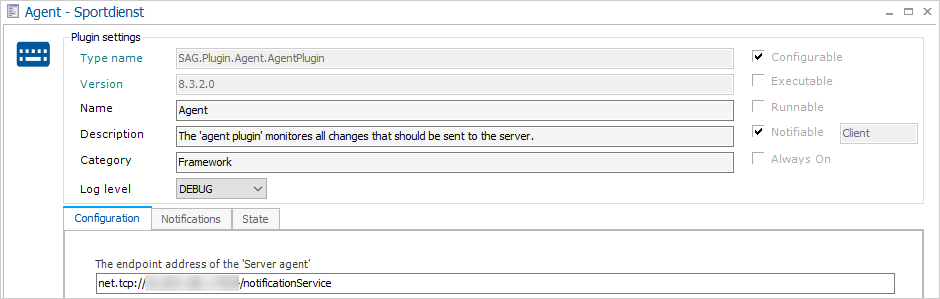
Agent plugin configuration
Set the configuration of the Agent plugin as shown in the following image.
 |
OdsKds plugin configuration
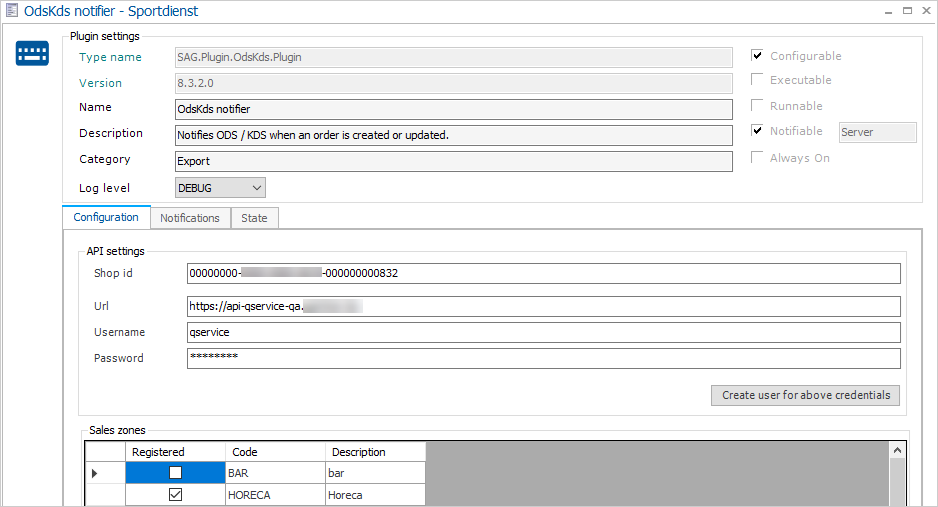
Set the configuration of the OdsKds plugin as shown in the following image.
 |
Note
The sales zone(s) selected in the OdsKds plugin must be the same ones you wish to use for the ODS app.
Device requirements
For ODS, the device must have Android OS 4.4.0 or newer.
Minimum device requirements
Type | Support |
Resolution |
|
Android | Android 4.4 or newer |
Internet connection | The application needs to connect to Recreatex Services by way of internet through at least one of the following:
|