Jan 7, 2026
Sales
Offer comment
Note
The possibility to manage comments for an offer is available only to specific venues. You can request Vintia support to enable this feature for your venue.
You can now mention users in the comments added at the offer-level.
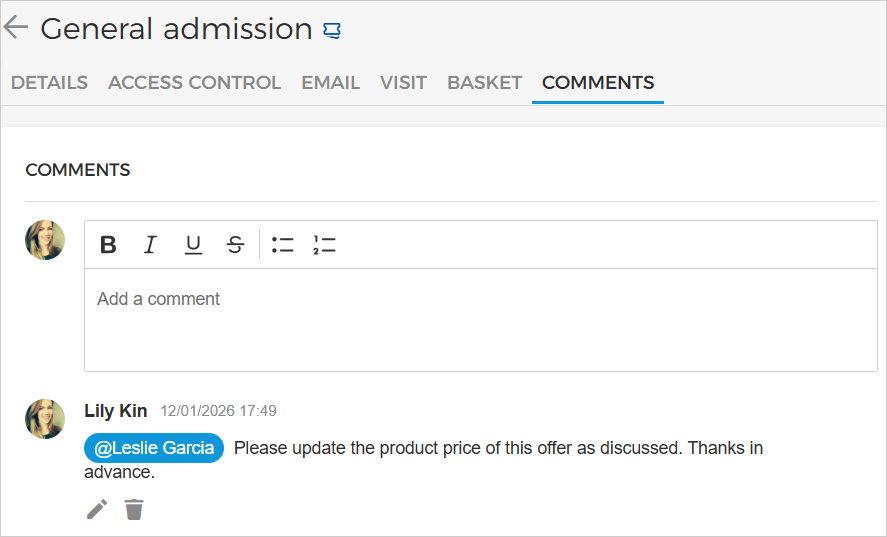
The mentioned users will receive a notification.

Group offers
You can now view the configured Pass and Pricing strategy in the group offer details.
If a group offer is configured as pass per group, only one ticket can be enabled for sale at a time. While multiple products can be linked, all except one will remain disabled.
Passes
Note
The possibility to access the Passes page is available only to specific venues. You can request Vintia support to enable this feature for your venue.
You can view passes in the overview for the selected visit period date and time and onwards.
You can search passes by pass ID, customer email, and order number, and also filter the pass list view.
It is possible to consult specific pass details (without promotion details) and redirect to the order overview page from the order number.
Cross-sell
A new configuration, 'Hide cross-sell items after adding to basket', has been added to the cross-sell rule conditions. This allows you to keep cross-sell offers visible after they are added to the basket, enabling visitors to purchase offers for multiple days.
It is now possible to set rule conditions based on offer category, order time, visit time, and order day.
Booking
Enhancements
When a time slot is blocked, the system cancels the linked tasks as well.
You can now view linked event details via the link in the offer details.
Trade for Venues
Enhancements
As a venue, it is possible to restrict resellers from modifying offer product prices using the 'Manage product price' toggle in partner configuration. When this toggle is disabled, any offer product price changes made by the venue will override reseller-defined offer product prices.
The reseller will receive a notification when the venue changes the product price for offers.
Admin
Enhancements
Updated Twitter links to X URL in admin and trade reseller tenant configuration settings, and in default product and email templates.
Venue users can configure 'Venue X URL' and 'Reseller X URL' fields in email and product templates for new X branding.
Venue users can set ‘product-price-period’ parameter in widget settings to define price display period (up to 30 days).
Pay
Enhancement
Introduced a default icon for new payment methods in Pay App and Widget for a consistent appearance.
Ticketing widget
Enhancement
Using the parameter
product-price-periodin the widget settings, you can define the price display period (up to 30 days).
Direct selling API
Added
Xto the response of the Get venue information endpoint.Added
pricingStrategyto the response of the endpoints Get offer detail, Get order detail , Get order detail (Visitor), and Calculate reserved order.
Reselling API
Added new response property
Xfor the Fetch venue information endpoint
Integration API
Added a new endpoint Get time slot details to retrieve details of a time slot.